
 Written by
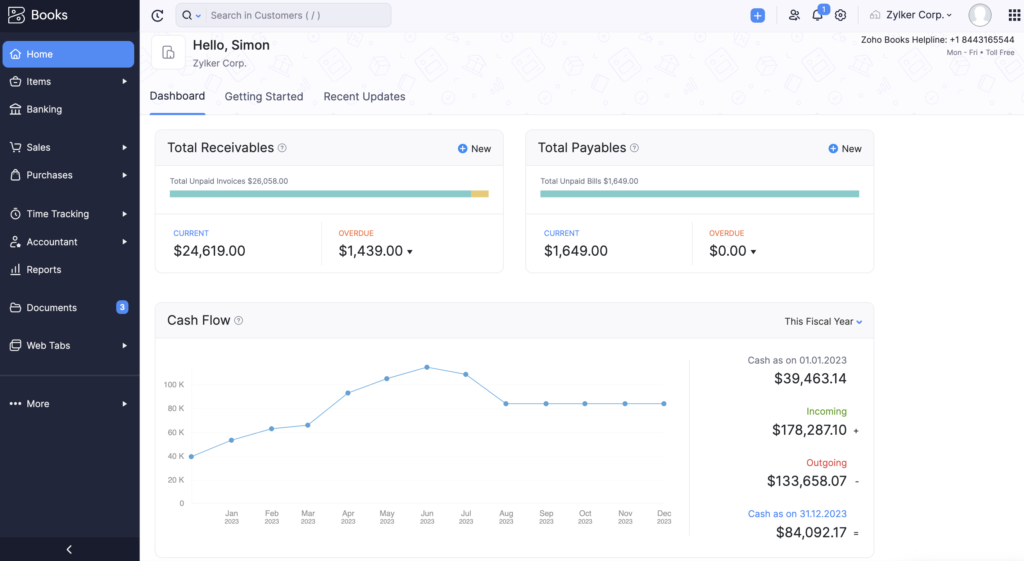
Best For: Small and mid-sized businesses looking for cloud accounting, invoicing, tax compliance, and end-to-end financial management
Key Features
- Invoicing & payment collection
- Expense tracking
- Bank reconciliation
- Inventory management
- Tax management
- Project billing & timesheets
- Financial reporting & analytics
- Workflow automation
- Multi-currency support
- Customer and vendor portals
Benefits
- Easy-to-use interface
- Automates accounting workflows
- Improves cash flow visibility
- Helps stay tax compliant
- Scales with growing businesses
- Integrates with multiple business apps
- Available on web and mobile
Pricing Details
Offers a forever free plan, along with multiple paid plans based on business size and feature requirements. Pricing varies by region and edition.
Any other relevant information
- Part of the Zoho ecosystem
- Supports integrations with payment gateways, banking services, and third-party apps
- Available in multiple global editions with region-specific tax compliance
- Mobile apps available for iOS and Android
- Trusted by businesses across various industries worldwide
Kashoo is a cloud-native accounting platform developed by TrulySmall Software, designed for small businesses, freelancers, and entrepreneurs who want intelligent bookkeeping automation without the complexity of feature-heavy platforms like QuickBooks or Xero. Its standout feature is the TrulySmall engine — an AI-powered automation system that learns your transaction patterns and automatically categorizes expenses, reconciles accounts, and generates accurate financial reports with minimal manual input. Unlike most accounting platforms that require regular manual intervention, Kashoo is designed to run largely on autopilot once connected to your bank feeds — making it particularly well-suited to business owners who want accurate books without spending significant time on accounting administration. With multi-currency support, a clean mobile-first design, and seamless accountant collaboration, Kashoo punches above its price point for businesses whose needs are primarily reporting, reconciliation, and tax preparation.
![10 Best Accounting Software For Small Businesses in 2026 [Pricing & Features]](https://media.licdn.com/dms/image/v2/D4E12AQGfa8v4LOn2aQ/article-inline_image-shrink_1000_1488/B4EZZnR5KOHYAU-/0/1745489468889?e=2147483647&v=beta&t=CMuaYmbMPJ9s-_fUAxh2D0BjytEIs6INMWF-r6JMldk)
Kashoo is the right choice for small business owners who are prepared to pay a modest subscription for highly automated, low-touch bookkeeping that keeps their accounts accurate with minimal daily effort. Its AI categorization engine and automatic reconciliation mean that business owners who connect their bank feeds can expect largely automated books — a significant time saving for entrepreneurs whose primary focus is running their business, not managing their accounting.
Pricing Plans
Plan | Price | Key Inclusions |
TrulySmall Accounting | $20/month ($216/year) | Automated Accounting | Send Invoices | Income & Expense Tracking | Sales Tax Tracking | Essential Reporting | True Double-Entry Ledger | IRS/CRA Standard Chart of Accounts |
Kashoo Advanced Accounting | $324/year | Send & Track Invoices | Customize Invoice Design | Accept Payments | Visual Dashboard | Advanced Business Reports | Income & Expense Tracking | Payroll Integration |
Notes:
Pricing and availability vary by country. Discount offers may apply.
Core Features of Kashoo
- AI-powered automatic transaction categorization and reconciliation
- Double-entry accounting with IRS/CRA-standard chart of accounts
- Professional invoice creation and online payment acceptance
- Income and expense tracking with automatic bank feed import
- Sales tax tracking and reporting
- Advanced financial reporting with business performance dashboards (Advanced plan)
- Payroll integration for supported regions
- Multi-currency support for businesses with international transactions
Pros & Cons
✔ PROS | ✘ CONS |
AI-powered automation delivers highly accurate, low-maintenance bookkeeping once bank feeds are connected | Integration library is narrower than competitors — fewer connections to third-party business tools |
Clean, uncluttered mobile-first interface makes financial management approachable on any device | Inventory management and payroll features are limited or require supplementary tools |
Multi-currency support and solid reporting for the modest price point | Not designed for businesses that have complex organizational structures or high transaction volumes |
Accountant collaboration tools streamline year-end and tax-time processes | |
Double-entry accounting provides the accuracy and compliance depth that growing businesses need |
Industries | Small Businesses, Freelancers, Remote Teams, Mobile-First Operations, Independent Contractors, Canadian Businesses |

FreshBooks is a cloud-based accounting platform built around a single, clear design philosophy: accounting software should be approachable enough for anyone to use without an accounting degree. Since its founding in 2003, it has grown to serve over 30 million users — primarily freelancers, solopreneurs, independent consultants, and small service-based businesses who want professional financial management without the complexity of enterprise platforms. FreshBooks is consistently ranked as the most intuitive accounting tool in user satisfaction surveys, and its time tracking, project profitability analysis, and beautifully designed client invoice system are features that larger platforms have repeatedly tried — and failed — to replicate with the same elegance. In 2026, its enhanced mobile application and expanded automation for late payment reminders and recurring billing make it even more compelling for professionals who bill by the hour.
FreshBooks Accounting Software Pricing
FreshBooks is the right choice for any professional who values speed, simplicity, and client-facing professionalism over deep accounting complexity. Its time tracking and project billing capabilities make it uniquely powerful for consultants and agencies that need to track billable hours, generate accurate project invoices, and analyse project profitability — all without involving an accountant in day-to-day operations.
Pricing Plans
Plan | Price | Key Inclusions |
Lite | $21/mo ($252/yr) | 5 Clients | Expense Tracking | Tax Reports | Estimates | Bank Reconciliation | Credit Card & Bank Transfer Payments | Best for Freelancers |
Plus | $38/mo ($456/yr) | 50 Clients | All Lite Features | Proposals & Client Retainers | Accountant Collaboration | Receipt Capture | Financial Reports | Best for Self-Employed Professionals |
Premium | $65/mo ($780/yr) | Unlimited Clients | All Plus Features | Accountant Access | Email Template Customization | Project Profitability Analysis | Best for Businesses with Contractors |
Select | Custom Pricing | Unlimited Clients | Lower Transaction Fees | Remove FreshBooks Branding | Dedicated Phone Support | Data Import via Easy Switch | Best for Teams |
Add-Ons | Team Members: $11/month per user | Advanced Payments: $20/month | FreshBooks Payroll: $40/month + $6/month per user |
- Professional invoicing with custom branding and automated payment reminders
- Integrated time tracking with project-level billing and profitability reports
- Real-time expense tracking with receipt capture via mobile
- Estimates and proposals with client acceptance workflow
- Client portal for invoice viewing and payment
- Accountant collaboration access on Plus and above
- Mobile app with full feature parity on iOS and Android
- 100+ integrations including Stripe, PayPal, HubSpot, and Gusto
Pros & Cons
✔ PROS | ✘ CONS |
The most intuitive, user-friendly interface in the entire accounting software category | Inventory management features are absent — not suitable for product-based businesses |
Excellent time tracking and project billing — genuinely superior to most competitors | Client-based pricing model means costs escalate as your client roster grows |
Client portal and proposal system streamline the full client billing lifecycle | Multi-currency support is limited to the Premium tier and above |
Fast and responsive customer support across chat and email channels | |
Mobile app is among the strongest in the category |
Industries | Freelancers, Independent Consultants, Creative Agencies, Coaches, Service Businesses, Solopreneurs |
30-day free trial available on all plans. Pricing and availability vary by country.
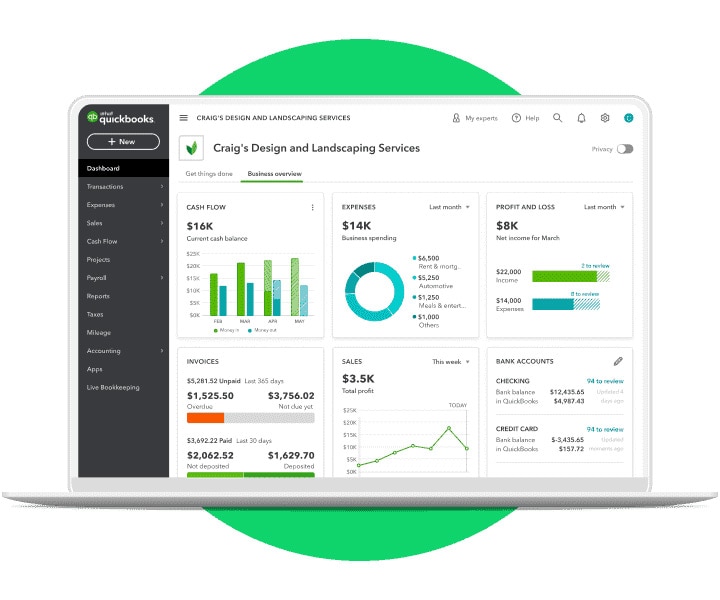
Intuit QuickBooks is the most widely used accounting platform in the world, with over 7 million active subscribers across more than 180 countries. Originally launched as a desktop application in 1983, QuickBooks Online has evolved into a sophisticated cloud-first platform that serves everyone from sole proprietors to mid-size enterprises with complex multi-entity financial needs. Its combination of advanced reporting, seamless payroll integration, robust inventory tracking, and a vast ecosystem of 650+ third-party integrations makes it the default choice for accountants and bookkeepers who work across multiple client businesses. In 2026, QuickBooks has strengthened its AI capabilities significantly — its automated transaction matching, predictive cash flow insights, and intelligent expense categorization reduce bookkeeping time by an estimated 30–40% for active users.
Intuit QuickBooks Accounting Software Pricing
- QuickBooks Online is the strongest choice for businesses that prioritize reporting depth, accountant collaboration, and ecosystem connectivity. Its Advanced plan, in particular, is engineered for scaling businesses that need workflow automation, custom reporting fields, and multi-location tracking — capabilities that competitors typically offer only at enterprise price points. The sheer number of accountants and bookkeepers who know QuickBooks intimately also reduces your hiring and outsourcing complexity significantly.
Pricing Plans
Plan | Price | Key Inclusions |
Simple Start | $35/mo | 1 User + Accountant | Income & Expense Tracking | Unlimited Custom Invoices | Insights & Reports | GST/VAT Tracking | 250-Item Chart of Accounts |
Essentials | $65/mo | 3 Users + Accountant | All Simple Start Features | Employee Time Tracking | Bill & Payment Management | Multi-Currency Support |
Plus | $99/mo | 5 Users + Accountant | All Essentials Features | Recurring Transactions | Employee Time Tracking | Up to 40 Classes & Locations |
Advanced | $235/mo | 25 Users + Accountant | All Plus Features | Unlimited Classes & Locations | Workflow Automation | Custom Reporting Fields | Unlimited Chart of Accounts | Online Backup & Restore |
30-day free trial on all plans. Pricing and availability vary by country. Discount offers may apply.
- Income and expense tracking with AI-assisted categorization
- GST and VAT tracking with automated compliance reporting
- Bank feed connection with real-time transaction sync
- Advanced inventory management with cost-of-goods tracking
- Receipt capture and organization via mobile
- Workflow automation on the Advanced plan
- Multi-currency support on Essentials and above
- 650+ third-party integrations including payroll, POS, and CRM systems
Pros & Cons
✔ PROS | ✘ CONS |
The deepest and most flexible reporting suite in the small business accounting category | Among the highest-priced options in the category, particularly at the Plus and Advanced tiers |
Strong integrations across payroll, point-of-sale, and CRM platforms | New users often find the interface dense and initially overwhelming |
Excellent multi-currency and inventory tracking for growing businesses | Customer support quality varies significantly by geographic region |
The most recognized and accountant-trusted platform globally — reduces outsourcing friction | |
AI-powered automation substantially reduces manual bookkeeping time |
Industries | Startups, Growing SMBs, E-Commerce, Professional Services, Retail, Accountants and Bookkeepers |
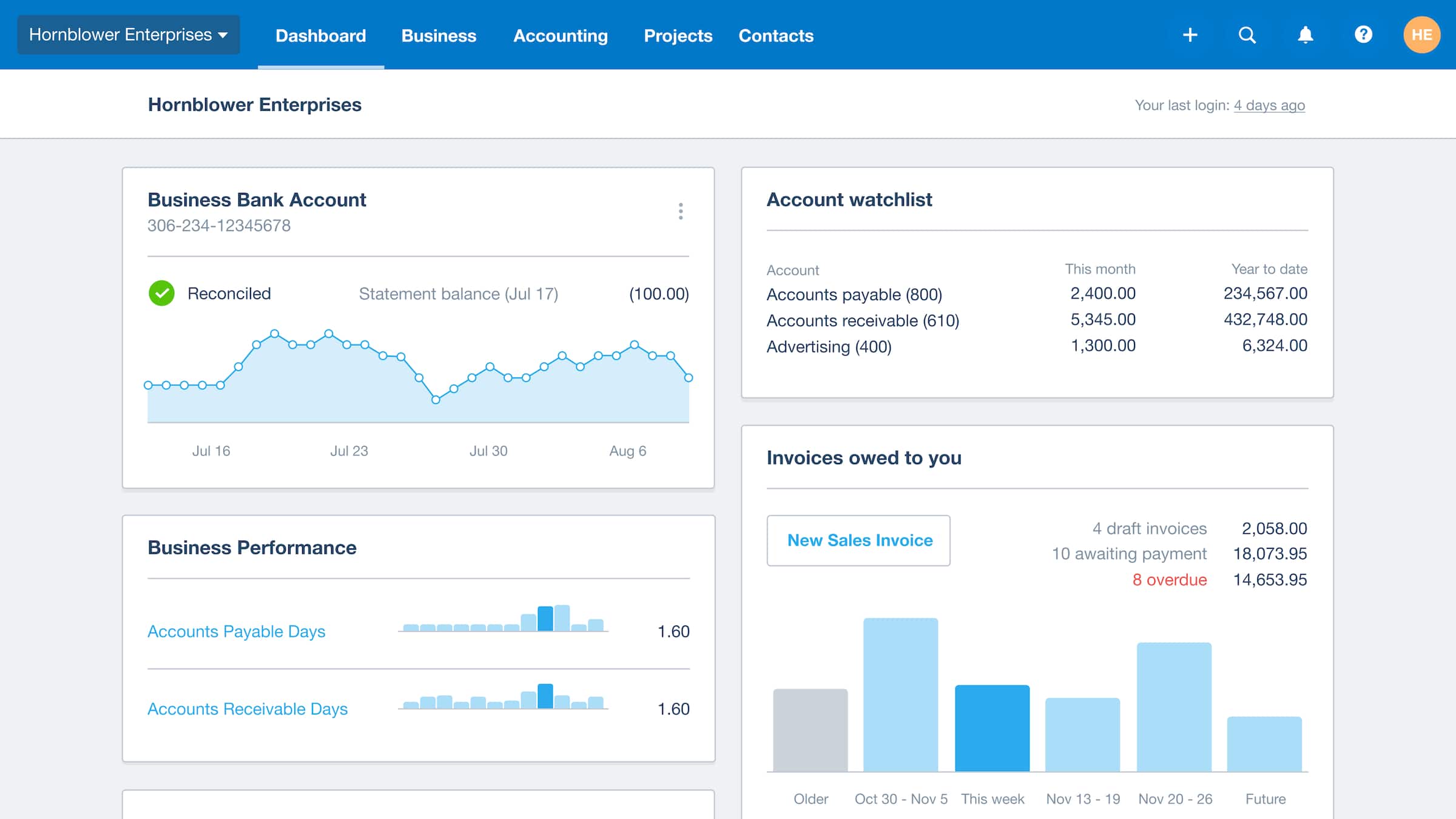
Xero is a New Zealand-born cloud accounting platform that has built one of the most loyal user bases in the category since its launch in 2006. Now serving over 3.7 million subscribers across 180+ countries, Xero is particularly dominant in the UK, Australia, New Zealand, and Southeast Asian markets — where its clean interface, accurate bank reconciliation engine, and strong multi-currency capabilities have made it the accountant-preferred alternative to QuickBooks. What distinguishes Xero is its commitment to the open accounting ecosystem: with 1,000+ marketplace integrations and an industry-leading API, Xero is the most connected accounting platform available, making it the natural foundation for businesses that depend on a diverse technology stack. Its 2026 AI enhancements — including predictive transaction coding and automated reconciliation suggestions — have further reduced the manual accounting workload for its users.
Xero Accounting Software Pricing
Xero is the definitive choice for businesses operating across multiple countries or currencies. Its multi-currency engine handles exchange rate gains and losses automatically, its global compliance tools adapt to local tax regulations in 180+ countries, and its accountant network — Xero’s ‘advisor community’ of over 200,000 certified professionals — means expert support is always within reach. For international e-commerce businesses and globally distributed service companies, Xero provides a clarity of financial visibility that region-specific tools like TallyPrime or Vyapar simply cannot offer.
Pricing Plans
Plan | Price | Key Inclusions |
Starter | $29/mo | 20 Invoices/Quotes | 5 Bills | Bank Transaction Reconciliation | Receipt & Bill Capture | Cash Flow Snapshot |
Standard | $46/mo | All Starter Features | Unlimited Invoices & Bills | Bulk Bank Reconciliation |
Premium | $69/mo | All Standard Features | Multi-Currency Support & Exchange Rate Management |
Add-Ons | Claim Expenses: from $4/month | Track Projects: from $4/month |
30-day free trial on all plans. Pricing and availability vary by country.
Key Features
- Online invoicing with automated payment reminders and online payment acceptance
- Bank reconciliation with AI-suggested transaction matching
- Multi-currency support with automatic exchange rate management (Premium)
- Business analytics dashboard with cash flow and profitability snapshots
- Bill management with payment scheduling
- Expense claims with receipt scanning
- 1,000+ marketplace integrations through the Xero App Store
- Project tracking with budget versus actual reporting (add-on)
Pros & Cons
✔ PROS | ✘ CONS |
The best multi-currency and international transaction management in the mid-market segment | Customer support is primarily help-article based — live support options are limited |
Accurate, AI-assisted bank reconciliation that reduces manual matching time | Inventory management requires a separate marketplace app rather than a native module |
Industry-leading integration marketplace with 1,000+ connected applications | Tax compliance tools for India-specific requirements such as GST are less comprehensive than Zoho Books or TallyPrime |
Strong accountant collaboration tools — Xero is widely preferred by accounting firms | |
Clean, modern dashboard that makes financial health immediately legible |
Industries | International Businesses, Startups, Global E-Commerce, Multi-Currency Operations, Accounting Firms |
Sage is one of the oldest and most trusted names in business accounting software, with a history stretching back to 1981 and a customer base spanning over 3 million businesses across 23 countries. Unlike the newer cloud-first platforms on this list, Sage offers a deliberate dual-track strategy: Sage Business Cloud Accounting serves small businesses and sole proprietors with a modern, browser-based experience, while Sage 50 — its established desktop platform — serves the more complex needs of small to medium enterprises that require advanced inventory management, serialized asset tracking, job costing, and detailed audit trails. This combination makes Sage uniquely versatile: it is the only platform in this comparison that can serve a sole proprietor’s basic invoicing needs and a 40-user manufacturing enterprise’s compliance requirements with purpose-built solutions for each.

A) Sage Business Cloud Accounting Price
Sage is the correct choice when your business has outgrown basic cloud accounting but is not yet large enough to justify an ERP system. Its Sage 50 desktop platform is particularly strong for manufacturing, construction, job-costing-intensive businesses, and organizations in regulated industries where audit trails, serialized inventory tracking, and formal budgeting are operational requirements rather than nice-to-have features.
Pricing Plans
Plan | Price | Key Inclusions |
Cloud Start | $19/mo | Unlimited Sales Invoices | Bank Reconciliation | GST/HST Calculation | English & French Support | Best for Freelancers |
Cloud Plus | $43/mo | All Start Features | Advanced Reports | Cash Flow Forecasting | Purchase Invoice Management | Automated Receipt Capture | Best for Small Businesses |
Cloud Standard | $63/mo | All Plus Features | Multi-Currency Banking | Exchange Rate Reports | Inventory & Stock Management |
50 Pro | $61.92/mo ($625/yr) | Single User | Invoice & Bill Tracking | Purchase Orders | Expense Management | Automated Bank Reconciliation | Reporting |
50 Premium | $239.17/mo up to 5 users ($2,391/yr) | 1–5 Users | Advanced Budgeting | Serialized Inventory Tracking | Advanced Reporting | Audit Trails |
50 Quantum | $452/mo up to 10 users ($4,546/yr) | Up to 40 Users | All Premium Features | Role-Based Permissions | Workflow Management |
Notes:
Cloud plans: 3-month free trial for new customers. Sage 50: 30-day trial on Pro and Premium only. Desktop pricing above is for new customers.
Core Features of Sage Accounting
- Core cloud accounting with bank feeds and reconciliation
- Advanced budgeting and cash flow forecasting
- Job costing and project profitability tracking
- Serialized inventory tracking for manufacturing and distribution
- Audit trails for compliance and regulatory requirements
- Multi-currency banking on Cloud Standard and above
- Payroll integration in supported regions
- French language support for Canadian businesses
Pros & Cons
✔ PROS | ✘ CONS |
The strongest option for job costing, manufacturing, and production-based businesses | The cloud interface feels less modern and polished compared to Xero, FreshBooks, or Zoho Books |
Sage 50 desktop provides enterprise-level features at a mid-market price point | Initial setup and configuration require meaningful time investment, particularly for Sage 50 |
Multi-entity and multi-currency support for complex business structures | The desktop version requires IT maintenance and is not available on non-Windows operating systems |
Audit trail capabilities meet regulated industry compliance requirements | |
Dual cloud/desktop offering provides flexibility not available from cloud-only competitors |
Industries | Manufacturing, Construction, Distribution, NGOs, Professional Services, Mid-Size Enterprises, Regulated Industries |
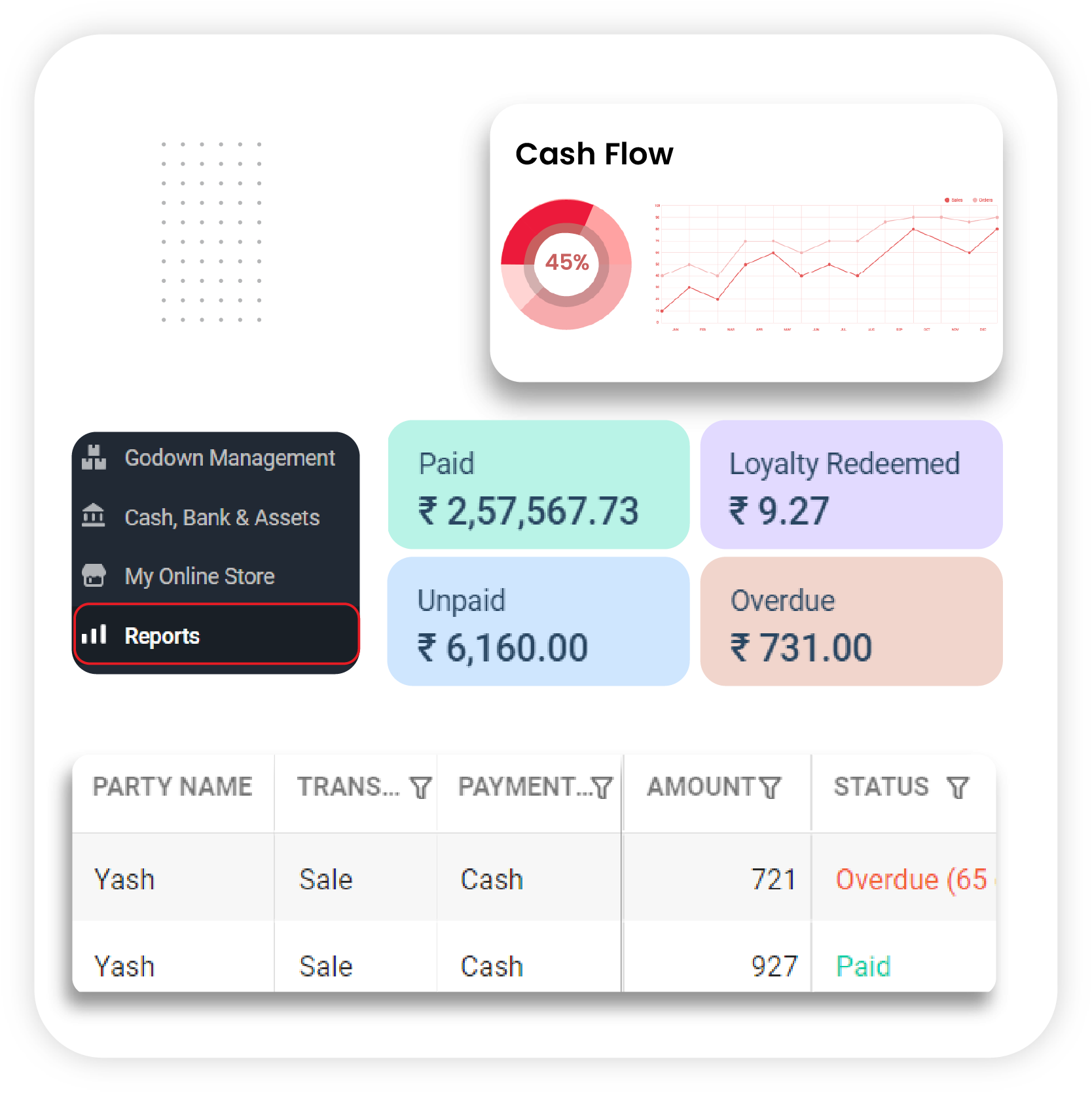
Vyapar is a billing and accounting application built specifically for India’s micro, small, and medium enterprise (MSME) segment — the tens of millions of shopkeepers, traders, service providers, and small manufacturers who need reliable financial management but cannot justify the cost or complexity of enterprise-grade accounting software. Available as both a Windows desktop application and an Android mobile app with real-time cloud synchronization between both, Vyapar meets Indian small business owners precisely where they are: at their shop counter, on their phone, or at their desk. Its GST compliance tools — including automated e-invoicing, e-way bill generation, and multi-GSTIN management — are comprehensive enough for most MSME regulatory requirements, while its inventory and stock management capabilities serve retail and trading businesses effectively. At a starting price of ₹283 per month, it is the most cost-effective full-featured accounting solution in this comparison.
Vyapar Accounting Software Pricing
Vyapar is the ideal first accounting software for Indian small business owners, traders, and shopkeepers who are transitioning from manual registers or basic spreadsheets. Its Android-first design and simple interface eliminate the intimidation factor that causes many small business owners to avoid digital accounting entirely. For businesses that primarily need billing, basic inventory management, and GST compliance without the overhead of a complex cloud platform, Vyapar delivers everything that matters at the lowest total cost of ownership in this list.
Pricing Plans
Plan | Price | Key Inclusions |
Silver — Desktop | ₹3,399/yr | ₹7,799/3 years | Track Income, Expenses & Cash Flow | Invoices & Quotations | GST Compliance | Full Inventory Management | Excel Import | Purchase & Sales Orders | Auto-Backup | 200 SMS Credits/year |
Gold — Desktop | ₹3,699/yr | ₹8,199/3 years | All Silver Features | E-Way Bill Generation | Quick Billing Mode | TCS on Invoices | Priority Customer Support |
Silver — Mobile | ₹699/yr | ₹1,499/3 years | All Silver Features on Android App |
Gold — Mobile | ₹799/yr | ₹1,699/3 years | All Gold Features on Android App |
Silver — Desktop + Mobile | ₹3,999/yr | ₹8,699/3 years | Silver Plan on Both Desktop and Mobile |
Gold — Desktop + Mobile | ₹4,299/yr | ₹8,999/3 years | Gold Plan on Both Desktop and Mobile |
Notes:
Pricing and availability may vary by region. Discount offers may apply seasonally.
Core Features of Vyapar
- Customizable invoice and quotation creation with GST compliance
- Accounts payable and receivable tracking with party-wise ledgers
- Full inventory management with stock tracking and low-stock alerts
- E-invoice and e-way bill generation and management
- Multi-user access with role-based permissions
- Real-time sync between desktop and mobile applications
- Auto-backup for data safety and recovery
- Tax calculation for GST, TCS, and TDS
Pros & Cons
✔ PROS | ✘ CONS |
The most affordable full-featured accounting solution in this comparison — outstanding value for Indian MSMEs | Not designed for large businesses, multi-branch enterprises, or complex organizational structures |
Simple, intuitive interface designed specifically for non-accountant business owners | Automation and third-party integration capabilities are significantly more limited than cloud competitors |
Android mobile app with real-time sync enables accounting from anywhere | No project accounting, time tracking, or multi-currency support for businesses with international operations |
Strong inventory, GST compliance, and e-way bill capabilities for the price point | |
Offline desktop functionality ensures operations continue without internet dependency |
Industries | Indian MSMEs, Retail Shops, Traders, Wholesalers, Service Businesses, Small Manufacturers, Pharmacies |
Wave is a cloud-based accounting platform that has built a devoted global following with a single compelling proposition: professional-grade invoicing, bookkeeping, and financial management at zero cost. Founded in 2010 in Toronto and acquired by H&R Block in 2019, Wave serves over 500,000 small businesses and freelancers who need a credible alternative to expensive accounting subscriptions — particularly in their early business stages when cash flow is tight and every recurring cost matters. Its free Starter plan includes unlimited invoicing, expense management, bookkeeping records, and cash flow management — features that competing platforms charge $15–30 per month to unlock. The Pro plan adds automatic bank transaction import and reconciliation for $16 per month, making Wave the most cost-effective fully functional accounting solution in this comparison. While Wave lacks the inventory management, payroll integration, and advanced reporting depth of QuickBooks or Zoho Books, it is an entirely capable platform for freelancers, solopreneurs, and small service businesses whose primary accounting needs are invoicing, expense tracking, and basic financial reporting.

Wave Accounting Software Pricing
Wave is the clear first choice for any freelancer, solopreneur, or very early-stage startup that needs professional accounting without a recurring software cost. Its free plan is genuinely functional — not a stripped demo — and provides everything a single-person service business needs to operate professionally. As your business grows beyond Wave’s capabilities, its data export makes migration to QuickBooks or Xero straightforward.
Pricing Plans
Plan | Price | Key Inclusions |
Starter | $0/month (Free) | Unlimited Estimates | Invoice, Bill & Bookkeeping Management | Mobile Invoicing | Cash Flow Management | Customer Dashboard |
Pro | $16/month ($170/year) | All Starter Features | Auto-Import Bank Transactions | Auto-Merge & Match Transactions | Unlimited Receipt Capture | Automated Late Payment Reminders |
Add-Ons | Receipt Capture (Starter Plan): $8/month or $72/year | Receipt Capture (Pro Plan): included |
Notes:
Pricing and availability vary by country. Discount offers may apply.
Core Features of Wave
- Unlimited invoice creation with professional templates and online payment acceptance
- Expense tracking and categorization for accurate P&L reporting
- Cash flow management with clear income and expense visualization
- Bank reconciliation with automatic transaction import (Pro)
- Receipt scanning and digital storage via mobile app
- Customer management dashboard for client payment tracking
- GST compliance tools for applicable regions
- Accessible from any device via browser or mobile app
Pros & Cons
✔ PROS | ✘ CONS |
The most generous free plan in the accounting software category — genuinely functional for solo professionals | No inventory, project management, or payroll features in most regions — limiting for product-based businesses |
Clean, approachable interface that makes bookkeeping accessible to non-accountants | Advanced reporting and automation capabilities are minimal compared to paid competitors |
Receipt scanning and online payment acceptance even on the free tier | Not designed to scale with growing businesses beyond the small freelancer or solopreneur stage |
Cloud access from any device — no installation or maintenance required | |
Ideal as a zero-cost entry point for businesses testing digital accounting for the first time |
Industries | Freelancers, Solopreneurs, Early-Stage Startups, Independent Contractors, Micro-Businesses, Creative Professionals |