
 Written by
 When you’re running a startup or a small business, you’re constantly juggling sales, leads, customer follow-ups, emails, support tickets, and internal coordination—often with a very small team. That’s exactly where an all-in-one CRM system earns its place.
Unlike enterprise CRMs built for massive organizations, small businesses and startups need CRM software that is easy to adopt, affordable, flexible, and capable of growing with them. The right CRM doesn’t just store contacts—it becomes the backbone of your sales and customer relationship strategy.
This guide walks you through what makes a good CRM for startups, the real problems it solves, and a carefully curated list of the best all-in-one CRM tools available today.
TL;DR
An all-in-one CRM helps startups and small businesses manage leads, sales, customer communication, automation, and reporting from one place. The best CRM software simplifies daily work, prevents missed follow-ups, improves team collaboration, and scales as the business grows. Choosing the right CRM depends on your budget, team size, ease of use, essential features, and how well it supports your sales and customer processes—there is no one-size-fits-all solution.
Table of Contents
ToggleWhat Is an All-in-One CRM?
CRM stands for Customer Relationship Management. At its core, CRM software helps businesses track customer data, manage sales pipelines, and maintain relationships.
An all-in-one CRM goes a step further by bringing multiple systems together in one place, including:
- Lead and contact management
- Sales pipeline and deal tracking
- Email and communication tools
- Marketing automation
- Customer support features
- Reporting and analytics
For startups, this matters because using five separate tools for five different jobs quickly becomes expensive, messy, and hard to scale.
What Are the Types of CRM for Startups?
There are different types of CRM software, and each one serves a specific purpose. Understanding these CRM types can help startups choose the right solution based on their goals and working style.
Below are the main types of CRM systems and how they support business growth:
| Type of CRM | Main Focus | Best For |
|---|---|---|
| Operational CRM | Automating sales, marketing, and customer service tasks | Improving daily operations and efficiency |
| Analytical CRM | Analyzing customer data and behavior | Making informed, data-driven decisions |
| Collaborative CRM | Sharing customer information across teams | Improving communication between sales, marketing, and support |
| Strategic CRM | Aligning customer data with business goals | Building long-term customer relationships |
| Campaign Management CRM | Planning and tracking marketing campaigns | Improving marketing performance and ROI |
| Free CRM | Offering basic CRM features at no cost | Startups with limited budgets |
Each type of CRM addresses different needs, and many modern all-in-one CRM tools combine several of these functions into one platform.
Why Startups and Small Businesses Actually Need CRM Software
Running a small business has never been easy. You’re handling leads, phone calls, follow-ups, team coordination—and at the same time, you’re expected to close deals and grow revenue. On top of that, today’s customers expect quick responses, instant updates, and smooth communication.
Let’s be honest—this is no longer possible with just a notebook or Excel sheet.
Here’s why CRM software has become essential for small businesses in 2026.
1. Leads Are Coming From Everywhere
Earlier, most leads came from referrals or local ads. Today, leads come from multiple digital sources such as JustDial, IndiaMART, your website, WhatsApp, Facebook Ads, and even Instagram DMs.
When leads are spread across different platforms, managing them manually becomes confusing.
- Common questions start popping up:
- Where did this lead come from?
- Has anyone contacted them already?
- Who in the team is handling this lead?
- A CRM system in the World collects all leads in one place, automatically organizes them, and assigns ownership. This helps you avoid confusion, missed opportunities, and duplicate follow-ups.
2. You Can’t Afford to Miss Follow-Ups
- Very few customers say “yes” on the first call. Most deals are closed after multiple follow-ups—sometimes after a few days, sometimes after a week.
- Without a proper system:
- Follow-ups are forgotten
- Calls happen too late
- Leads move to competitors
- A CRM solves this by sending automatic reminders. It clearly tells you:
- “Call Rajeev today — he asked for a callback on Tuesday.”
- No guesswork. No delays. Just timely action.
3. Your Team Needs a Clear Process
- Without a CRM, team coordination becomes messy. Two people may call the same lead—or worse, no one calls at all.
- A CRM gives your entire team a shared view of:
- Who is handling which lead
- The current stage of every deal
- The next action required
- This removes confusion, improves accountability, and ensures no deal falls through the cracks. Everyone knows what they need to do.
4. Speed Matters More Than Ever
- Today’s customers move fast. If a lead fills out a form or calls your business and doesn’t get a response within minutes, they simply contact another company.
- With a CRM:
- Your team gets instant notifications when a new lead arrives
- Leads are auto-assigned
- Follow-ups happen immediately
- Quick responses make your business look professional and trustworthy—and that often decides who wins the deal.
5. You Don’t Need to Be Tech-Savvy
- Many small business owners worry:
- “Will this be too complex?”
- “Can my team even use it?”
- The good news is that modern CRM software is built for normal users, not tech experts. If you can use WhatsApp or Google Sheets, you can use a CRM.
- Simple dashboards, clear options, and mobile apps make it easy for you and your team to get started without stress.
Top 10 All-in-One CRM Software for Small Businesses
- Zoho CRM
- Pipedrive CRM
- Freshsales CRM
- HubSpot CRM
- EngageBay CRM
- Agile CRM
- Insightly CRM
- Bitrix24 CRM
- Nimble CRM
- Salesforce CRM
Overview Of The 10 Best CRM Software Reviewed and Compared
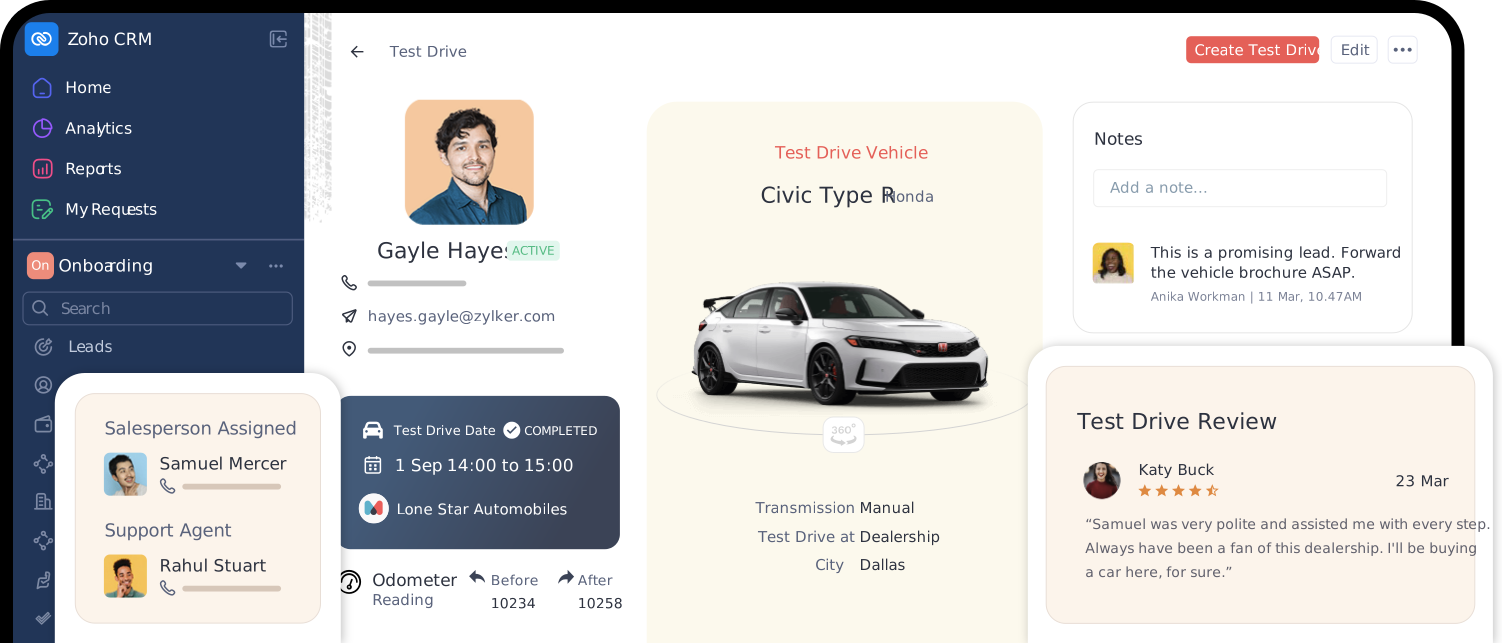
Zoho CRM is a highly customizable, easy-to-use sales software that helps sales teams streamline and automate processes from lead management, pipeline management, to reporting and dashboards.
Best for: Sales teams of businesses of varying sizes and industries.
Key features
- AI-powered sales assistant – Prediction, recommendation, and AI agents for enhanced productivity
- Sales Force Automation – Craft end-to-end customer journeys, complete pipeline management, automation, and Configure, Price, Quote (CPQ)
- Process management – Build standard, guided processes that your sales team can follow
- Lead management – Capture, enrich, assign, qualify and convert your best leads for a healthy sales pipeline
- Customization – Make Zoho CRM your own with custom fields, layouts, modules, and even the CRM UI
- Advanced BI – Powerful reporting capabilities for dashboards that matter
- Mobile CRM – Sell on the go; let field reps access to rich context and powerful tools to close deals on the move.
- Extensive integration – Integrates with 1200+ popular business apps like WhatsApp, Gmail, Mailchimp, Shopify, Xero, and more
- Thoughtful UI – Intuitive UI that is easy-to-use and quick to get used to
Benefits
Zoho CRM offers a complete platform for growing businesses. The versatility of the platform lies in its ability to provide no-code, low-code, and pro-code automation and customization capabilities. Over 300,000 businesses trust Zoho CRM to run their business with us.
- Easy implementation, fast adoption, and effortless scaling as you grow
- Transparent pricing—know what you’re paying for
- Data sovereignty
- GDPR and HIPAA compliant
Pricing details
Zoho CRM offers a pay-as-you-grow pricing plan.
- Free: Complete CRM starter kit. Free forever for 3 users.
- Standard: $14 /user/month (billed annually) – Best for beginners looking to get started with their CRM journey
- Professional: $23/user/month (billed annually) – For sales team looking to get serious about automation
- Enterprise: $40/user/month (billed annually) – Deep customization to suit your business
- Ultimate: $52/user/month (billed annually) – Truly ultimate Zoho CRM experience
Pipedrive is a sales-driven CRM built to help small and medium-sized businesses manage their sales process more effectively. Its clean interface and visual pipeline make it easy for teams to track leads, manage deals, and automate routine tasks, ensuring no sales opportunity is missed. Pipedrive is especially popular with sales teams that want a simple, focused tool to improve productivity and close deals faster.
Key Features
- Visual sales pipeline: Track and manage deals easily using customizable pipeline stages
- Contact and lead management: Store, organize, and access customer information from one central place
- Email integration: Connect with popular email providers to send and receive emails directly within the CRM
- Reporting and analytics: Create reports to understand sales performance and team progress
- Integration capabilities: Connect with multiple third-party tools to extend functionality
Pricing
Pipedrive offers five pricing plans designed to suit different team sizes and requirements:
- Essential plan: ₹1,195 per user per month (billed annually), includes core CRM features for small teams
- Advanced plan: ₹2,220 per user per month (billed annually), adds advanced email integration and automation
- Professional plan: ₹4,172 per user per month (billed annually), includes detailed reporting and sales forecasting
- Power plan: ₹5,023 per user per month (billed annually), built for larger teams with stronger collaboration tools
- Enterprise plan: ₹6,726 per user per month (billed annually), offers full feature access with priority support
3. Freshsales
Freshsales balances simplicity with power. It offers built-in phone, email, automation, and AI-based lead scoring, making it a strong option for startups that want smarter selling without heavy setup.
Best for: Fast-growing startups
Standout strength: AI-driven sales insights
Pricing
The CRM software follows a flexible pricing model designed to suit different business sizes and needs.
- Free plan: Available for up to 3 users, no credit card required, with 24×5 support
Freshsales CRM
- Growth: ₹749 per user per month (billed annually)
- Pro: ₹3,299 per user per month (billed annually)
- Enterprise: ₹4,899 per user per month (billed annually)
The Freshsales Suite uses the same pricing structure, with an additional add-on that includes 500 extra marketing contacts.
Freshmarketer
- Free: ₹0 per month with 100 marketing contacts (billed annually)
- Enterprise: ₹1,249 per month with 400 marketing contacts (billed annually)
4. HubSpot CRM
HubSpot CRM is a collection of individual tools designed to support different parts of a business, including marketing, sales, customer service, and operations. These tools can be purchased separately or combined to create a complete all-in-one CRM system, depending on your needs.
HubSpot stands out as one of the best CRM platforms for startups for several reasons. One major advantage is the HubSpot for Startups program, which offers startup-focused onboarding, personalized training, and significant discounts—up to 90% in the first year for eligible startups. This helps early-stage companies keep costs low while focusing their budget on growth.
Another key benefit is HubSpot’s free plan. Startups can access a lightweight version of HubSpot’s marketing, sales, operations, and customer service tools at no cost. This makes it easy to get started without any upfront investment.
The free CRM plan includes features such as a shared inbox, contact management, live chat, email marketing tools, deal tracking, dashboard reporting, and on-screen calling. As your business grows, you can upgrade by adding paid packages to unlock more advanced features when needed.
In late 2026, HubSpot expanded its AI capabilities with the launch of the Breeze AI ecosystem. Through the Breeze Marketplace, startups can now use specialized AI agents—such as Prospecting Agents or Data Agents—to automate internal tasks and improve productivity.
Finally, HubSpot offers HubSpot Academy, which provides unlimited free access to training courses and educational resources. For startups, this ongoing guidance helps teams learn the platform faster and get more value from their CRM investment.
The Best Free CRM for Startups
Specifications
- Starting price: From $45 per month
- Free plan: Yes (free forever)
- Free trial: 14 days
- Customer support: Live chat, phone support, online meetings
Reasons to Buy
- Strong free-forever CRM plan
- Easy to use and beginner-friendly
- Supports over 300 third-party integrations
Reasons to Avoid
- Paid plans can become expensive as you scale
- Free plan does not include phone support
5. EngageBay CRM
EngageBay positions itself as a true all-in-one platform—combining CRM, marketing automation, and customer support at a price startups can afford.
Best for: Small teams wanting everything in one tool
Standout strength: Affordable all-in-one approach
Key Features
- Email marketing tools
- Contact and customer management
- Marketing automation capabilities
- Built-in helpdesk and support tools
Third-Party Ratings
- Capterra: 4.7 out of 5
- G2: 4.7 out of 5
- SoftwareSuggest: 4.7 out of 5
- TechJockey: 4.5 out of 5
Pros
- Cost-effective all-in-one CRM solution
- Easy-to-use and intuitive interface
- Powerful automation features
- Reliable reporting and analytics
- Cons
- Limited SMS features
- Basic sales pipeline functionality
- Limited email template customization
Pricing
- Free plan: Available
- Mid-tier plan: ₹2,905 per user per month
- Enterprise plan: ₹5,810 per user per month
6. Agile CRM
Agile CRM is a feature-packed CRM platform built for small and medium-sized businesses working with limited budgets. Both the free and Starter plans include tools for contact management, sales tracking, marketing, and customer support. Given how many features it offers at a low price, it often feels surprising that its G2 rating remains around 4.0 out of 5.
That said, Agile CRM may not be the best choice for everyone. Businesses that need extensive automation and integrations on a tight budget may find it limiting. Similarly, teams looking for a simple, easy-to-learn CRM may struggle, as the platform has a steeper learning curve due to its wide range of features.
Agile CRM Pros
- Offers a free plan for up to 10 users
- Paid plans start at $9.99 per user per month
- Entry-level plan covers essential CRM features for small businesses
- Includes a wide range of marketing and customer service tools
- Phone support is available for all paid plans
Agile CRM Cons
- Steep learning curve due to feature complexity
- No two-way email sync on the free plan
- Limited integrations on free and lower-tier plans
- Customer support is unavailable on weekends
- Requires a company email address for account registration
- What’s Included in Agile CRM’s Lowest Paid Plan
- Core Features
- Mobile app: Available
- Contact management: Included
- Follow-up tracking: Not included
- Sales pipelines: Included
- Duplicate management: Included
Centralization Tools
- Centralized workspace: Not available
- Dashboard: Included
Communication Tools
- Two-way email sync: Included
Simple Automation
- CRM workflows: Included
- Sales email sequences: Included
- Browser extension for automatic lead capture: Available for Gmail, LinkedIn, Facebook, and more
Customer Support
- Email support: Available on weekdays
- Live chat: Not available
- Phone support: Available on weekdays
Pricing
- Price: $9.99 per user per month
- Free trial: Not available
- Free plan: Available for up to 10 users
- Next paid plan: Significantly higher at $39.99 per user per month
7. Insightly CRM
Insightly blends CRM with light project management, making it useful for businesses where sales and delivery are closely linked.
Key Benefits:
- Integrates business processes to support smoother team collaboration
- Streamlines sales workflows to drive higher revenue
- Supports faster growth through improved personalization
8. Bitrix24 CRM
Bitrix24 is an all-in-one CRM solution built to help businesses manage customer relationships, tasks, projects, and communication from a single platform. It is widely used by small and medium-sized businesses that want a complete system without relying on multiple tools. By combining lead management, collaboration, and communication features, Bitrix24 helps teams streamline daily operations and improve overall productivity.
Key Features
- All-in-one CRM platform: Combines sales, marketing, customer support, and billing tools in one system
- AI assistant (CoPilot): Automatically transcribes calls, updates CRM records, and predicts deal outcomes
- Workflow automation: Automates tasks, follow-ups, and internal approvals using customizable rules
- Integrated contact center: Enables communication through WhatsApp, phone calls, live chat, email, and social media
- Custom dashboards: Provides real-time reports to monitor KPIs and team performance
Pricing
- Basic plan: ₹1,590 per organisation per month (billed annually), includes 5 users
- Standard plan: ₹3,493 per organisation per month (billed annually), includes 50 users
- Professional plan: ₹6,993 per organisation per month (billed annually), includes 100 users
- Enterprise plan: ₹13,993 per organisation per month (billed annually), supports 250 to 10,000 users
9. Nimble CRM
Nimble is a social CRM designed to help small businesses and entrepreneurs build stronger customer relationships. It collects contacts and messages from social media platforms, automatically enriches contact profiles, and brings all interactions into a single view.
Nimble holds a 4.5 out of 5 rating on G2. However, compared to many other CRM tools, it is relatively expensive and places usage limits on key features such as automation, data enrichment, and email sequences. Access to higher limits often requires additional paid add-ons.
Nimble CRM Pros
- One fixed pricing plan that includes core CRM features for small businesses
- Lightweight platform with a minimal learning curve
- Supports an unlimited number of sales pipelines
- Captures contact data from social media platforms, business apps, email inboxes, and websites
- Pulls interaction history directly from X, LinkedIn, and Facebook.
Nimble CRM Cons
- Additional fees for add-ons and restricted access to advanced features
- Limited workflow automation and data enrichment (25 actions per month)
- Email sequences and mass emails capped at 1,000 per month unless upgraded
- Large number of subtabs can make navigation less intuitive
- No traditional phone support and no customer assistance on weekends.
What’s Included in Nimble CRM’s Lowest Plan
Core Features
- Mobile app: Available
- Contact management: Included
- Follow-up tracking: Limited to reminders only
- Sales pipelines: Unlimited
- Duplicate management: Included
Centralization Tools
- Centralized workspace: Not available for contact creation
- Dashboard: Included
Communication Tools
- Two-way email sync: Included
Simple Automation
- CRM workflows: Included (25 per month)
- Sales email sequences: Included (1,000 per user per month)
- Browser extension for automatic lead capture: Available for LinkedIn, Facebook, X, and other websites
- Customer Support
- Email support: Available
- Live chat: Available
- Phone support: Available via 1:1 screen sharing (15 minutes)
Pricing
- Price: $24.90 per user per month
- Free trial: Available for 14 days
- Free plan: Not available
- Next paid plan: Not available
10. Salesforce CRM
Salesforce is the most widely used CRM platform in the world and has built a strong reputation as one of the most reliable CRM solutions available.
Because Salesforce is so popular, many sales professionals already have experience using it. This makes onboarding easier as your startup grows and you begin hiring more sales representatives. However, the full Salesforce platform can be expensive, which may not suit early-stage startups.
To address this, Salesforce offers Salesforce Essentials, a more affordable version designed for small businesses and startups. While it comes with fewer advanced features, it provides a solid foundation for teams that plan to upgrade to the full Salesforce platform as their business scales.
Salesforce Essentials allows startups to manage customer data, track sales activities, and support customers from a single, centralized dashboard. It also integrates well with commonly used tools such as ActiveCampaign, Zapier, and DocuSign, making it easier to connect with your existing software stack.
Salesforce has also adapted to recent advances in artificial intelligence. In late 2026, the company introduced a stronger focus on Agentforce, moving beyond basic chatbots to more advanced autonomous agents. For startups, this means the Starter Suite now includes agents that can proactively research leads and draft proposals without manual prompts.
The Best CRM Overall
Specifications
- Price: From $25 per user/month
- Free plan: No
- Free trial: 14 days
- Customer support: Ticket-based support
Reasons to Buy
- Good balance between customization and built-in features
- Works smoothly with other Salesforce products
Reasons to Avoid
- More expensive compared to many alternatives
- Limited customer support contact options
- Professional services can be costly
Summary Table — Top CRM Tools for SMBs (2026)
| CRM | Best For | Free Plan | Key Focus |
|---|---|---|---|
| HubSpot CRM | Startups & SMBs | Yes | All-in-one growth |
| Pipedrive | Sales teams | No | Pipeline management |
| Freshsales | Scaling startups | No | AI sales tools |
| Zoho CRM | Budget teams | No | Custom workflows |
| EngageBay | Small teams | Yes | All-in-one affordability |
| Agile CRM | Marketing automation | Yes | Sales + marketing |
| Insightly | Service-based teams | No | CRM + projects |
| Bitrix24 | Collaboration | Yes | CRM + HR |
| Nimble | Relationship tracking | No | Contact enrichment |
| Salesforce Essentials | Scaling businesses | No | Enterprise features |
What Makes a Great CRM for Startups?
Not every CRM is startup-friendly. The best ones share a few key qualities:
- Cloud-based access – No infrastructure headaches
- Easy onboarding – Your team should learn it quickly
- Customizable workflows – Every business sells differently
- Scalable pricing – Affordable now, expandable later
- Essential CRM features only – No unnecessary complexity
- Free trial or free plan – You should be able to test before committing
Benefits of Using an All-in-One CRM
Running a startup is exciting, but it can also feel overwhelming—especially when you’re managing customers, leads, and sales at the same time. A CRM system helps bring structure and clarity to this process.
Here are the key benefits of using CRM software for startups:
1. Keep All Customer Conversations in One Place
Tracking emails, calls, and social media messages manually can quickly become unmanageable. A CRM stores every customer interaction in one centralized system. This gives you a complete view of each customer’s history, preferences, and needs, making communication more personal and effective.
2. Stay in Control of Your Sales Pipeline
Many startups struggle to track where leads stand in the sales process. A CRM clearly shows each stage of your sales pipeline, so nothing slips through the cracks. Automated reminders and follow-ups reduce manual work and help your team focus on building real relationships instead of chasing tasks.
3. Improve Team Collaboration
When sales, marketing, and support teams work with the same customer data, collaboration becomes easier. A CRM keeps everyone aligned, reduces miscommunication, and prevents duplicate work by ensuring all teams have access to updated information.
4. Deliver Faster and More Personalized Customer Support
Customers expect quick responses. With a CRM, all customer details are instantly available when someone reaches out. This allows your team to respond faster, provide better support, and create positive customer experiences that encourage loyalty.
5. Make Better Decisions with Real-Time Insights
A CRM provides clear insights into sales performance, marketing campaigns, and customer behavior. By understanding what’s working and what isn’t, startups can make smarter decisions and focus on activities that drive real growth.
6. Prepare Your Startup for Future Growth
Startups are built to grow, and CRM software supports that journey. Choosing an affordable CRM early helps you scale smoothly without needing to switch systems later. A scalable CRM grows with your business as your team, customers, and data expand.
How to Know If a CRM Is Right for You
The simplest answer: use it.
Most CRM providers offer free trials or free plans. During testing, ask:
- Does my team actually enjoy using this?
- Does it simplify our sales process?
- Can it grow with us?
If the CRM feels like extra work, it’s not the right one.
Core Problems an All‑in‑One CRM Solves
CRM software helps eliminate problems that quietly hurt growth:
- Scattered customer data
- Inconsistent follow‑ups
- Poor handoff between sales and support
- No visibility into pipeline health
- Guesswork instead of forecasting
- By centralizing information, CRM creates alignment.
How to Choose the Best CRM Solution for Your Business
To choose the right CRM solution, the first step is to clearly understand your business needs. Ask yourself whether you need specific features or a complete all-in-one CRM system.
For sales-oriented call center teams handling high volumes of inbound and outbound calls, features such as lead management, sales pipelines, automated outreach, call logging, and call tracking are essential. In such cases, a flexible platform like HubSpot can be a strong choice, allowing businesses to start with the core CRM and scale by adding the Sales Hub as call volumes, agent activity, and performance-tracking requirements increase.
On the other hand, if you are looking for a cost-effective, end-to-end CRM solution with a wider range of features, Salesforce Essentials is a reliable option that covers sales, customer data, and basic automation.
Next, think about your main priorities. If ease of use is your top concern and you want to avoid spending weeks onboarding new sales team members, Pipedrive is a strong option. It is known for its simple interface and quick setup.
If you are comfortable spending more time on setup and want access to advanced customization options, Zoho CRM allows you to build and design an interface that matches your specific business workflows.
Pricing is another important factor. Startups often feel tempted to choose the cheapest CRM available, especially when budgets are tight. However, the lowest price does not always mean the best long-term value. A good rule of thumb is to select a CRM that can scale as your business grows.
Some CRM platforms charge based on the number of contacts stored or the number of users added. This pricing model allows startups to begin with a smaller plan and upgrade gradually as their team and customer base expand.
How We Tested CRM Solutions for Startups
To evaluate CRM software for startups, multiple factors were considered. Each CRM was reviewed based on the features it offers, such as lead management, workflow automation, unified inboxes, and call tracking, and how well these features support the needs of a growing startup.
We also examined the number of third-party integrations each CRM provides and how easy the platforms are to use. This assessment was based on hands-on experience as well as feedback from real users.
Additional considerations included the quality of customer support, the availability of documentation and learning resources, and the level of customization offered by each CRM.
Pricing played a major role in the evaluation process. Different pricing models were analyzed to determine how affordable and scalable each solution is. The aim was to identify CRM tools that deliver the best value for money for startups and small businesses.
What Are the Essential CRM Features for Startups?
Startups need tools that save time, not add complexity. A good CRM should simplify daily work and help teams stay focused. Below are the essential CRM features every startup should look for:
1. Contact Management
A CRM should store all customer details—names, emails, phone numbers, and social profiles—in one place. Advanced systems also allow you to segment contacts based on behavior, interests, or demographics, making communication more targeted.
2. Sales Pipeline Management
A visual sales pipeline helps startups track deals, monitor progress, and identify bottlenecks. Drag-and-drop pipelines make it easy to move deals between stages and keep sales activities organized.
3. Email Integration
Switching between email and CRM wastes valuable time. A good CRM integrates directly with your email, allowing you to send messages, track conversations, and automate follow-ups from one dashboard.
4. Task and Activity Management
Managing tasks is part of daily startup life. CRM software should help schedule calls, set reminders, log meetings, and assign tasks—keeping both individuals and teams aligned and organized.
5. Lead Scoring
Not every lead is ready to buy. Lead scoring helps startups identify high-quality prospects by ranking leads based on behavior and engagement. This allows sales teams to focus on leads most likely to convert.
6. Mobile Accessibility
Startups often work on the go. A mobile-friendly CRM ensures access to leads, tasks, and updates anytime, anywhere—without being tied to a desk.
7. Integration with Other Tools
A CRM should work smoothly with the tools your startup already uses, such as marketing platforms, accounting software, and social media tools. Strong integrations create a more efficient and connected workflow.
8. Reporting and Analytics
Growth depends on understanding performance. A startup CRM should offer clear and simple reports on sales, marketing, and customer support. These insights help teams measure progress and make faster, smarter decisions.
What Makes a CRM Truly “Affordable”?
The word affordable sounds simple, but when it comes to CRM software, price alone doesn’t tell the full story.
A CRM that costs ₹200–₹300 per month may look cheap, but if it’s confusing, unused by your team, and still causes missed follow-ups, it’s not affordable at all.
On the other hand, a CRM that costs ₹599 per user per month—but saves hours daily and helps close more deals—offers real value.
Let’s break down what “affordable CRM” should really mean.
1. It Fits Your Budget and Your Daily Workflow
A CRM isn’t affordable if it looks cheap but doesn’t match how your team actually works.
For example, you might choose a CRM priced at ₹700 per month, only to realise later that:
- WhatsApp lead capture costs extra
- Calling features need an upgrade
- Lead assignment isn’t included
Suddenly, the “cheap” tool becomes expensive.
A truly affordable CRM includes essential features like lead capture, calling, follow-ups, and team management—without surprise charges.
2. It Doesn’t Slow Your Team Down
If a CRM needs long training sessions, complex setup, and constant explanations, your team won’t use it.
And if they don’t use it, you’ll be back to Excel within days.
An affordable CRM is one your team actually enjoys using. It should be:
- Easy to learn
- Quick to set up
- Familiar, like apps they already use
If your sales team says, “Haan, yeh toh simple hai”, that’s a CRM worth paying for.
3. It Works Even Outside the Office
Your team isn’t always at a desk. They’re travelling, visiting customers, working remotely, or calling from mobile phones.
If a CRM doesn’t work well on mobile, it’s just a desktop tool pretending to help.
A good CRM mobile app should allow your team to:
- Add leads on the go
- Call directly from the app
- Receive follow-up reminders
- View lead history before meetings
If your team can’t use it in real time, they simply won’t use it.
4. It Helps You Close Deals, Not Just Store Data
Some CRMs act like digital notebooks—they store information but don’t guide action.
That’s not enough.
A useful CRM actively supports sales by:
- Showing who to call today
- Highlighting overdue follow-ups
- Identifying cold leads
- Tracking team performance
It should work like a silent assistant, helping your team focus on closing deals—not managing data.
If it doesn’t do this, even ₹500 per month is too expensive.
5. It Grows With Your Business
Today your team might be three people. Soon it could be seven, then fifteen.
An affordable CRM respects your growth. It should:
- Let you start small
- Allow gradual upgrades
- Add value as you scale
If pricing jumps suddenly or useful features are locked behind forced upgrades, growth becomes painful.
Your CRM should grow with your business—not slow it down.
6. It Helps You Make Decisions, Not Guess
At some point, every business owner asks:
- How many leads are we getting?
- Who is following up properly?
- Why are deals getting stuck?
An affordable CRM gives clear answers. It shows real data in simple reports—without needing advanced Excel skills.
More clarity leads to better decisions.
Better decisions lead to growth.
That’s the real return on investing in a CRM.
Final Thoughts
There’s no single “best CRM” for every startup—but there is a best CRM for your stage, team size, and sales process. An all-in-one CRM system helps small businesses manage sales, leads, customers, features, pricing, and growth from one place.
Choose simple first. Scale later.
Best CRM for Startups: Frequently Asked Questions
There is no single CRM that fits every startup. The best CRM for your business depends on factors such as your company size, goals, and budget.
HubSpot is often considered a top choice due to its generous free plan, wide range of tools, and special discounts for startups. Zoho CRM is another strong option, especially if you already use other Zoho products or want more control over customization.
For startups that need strong project management and workflow automation, Insightly stands out. If simplicity is your priority, Pipedrive is easy to use and quick to implement.
If you prefer a well-known platform with proven reliability, Salesforce Essentials offers a simplified and affordable version of a leading enterprise CRM.
While startup-focused CRM tools may not include all the advanced features used by large enterprises, there are several essential features every startup should look for.
These include contact management, lead tracking and scoring, sales pipeline management, and analytics. Mobile access is also important, as many startups manage customer interactions both inside and outside the office.
Scalability is another critical factor. A startup may be small today but aim for rapid growth in the future. Choosing a CRM that can grow alongside increasing customers and operational needs is essential.
The time required to set up a CRM depends on the complexity of the platform and the specific needs of the startup. Basic CRM systems with minimal customization can often be set up within a few days.
More advanced implementations involving data migration, integrations, and custom workflows may take several weeks or even months. If speed is important, startups should look for CRM solutions that offer quick setup and simple interfaces.
Since user adoption is critical to CRM success, startups should choose platforms that provide strong onboarding, training materials, and responsive customer support.
Many CRM providers offer tutorials, documentation, and guided learning paths. Some also provide dedicated startup support.
For example, Salesforce offers free tutorials with step-by-step guidance and real-world use cases. HubSpot provides a free CRM course that helps beginners understand how to use the platform effectively. For teams with little prior CRM experience, access to training and support can make a major difference.
One of the most common challenges startups face when adopting a CRM is resistance to change. Team members may be hesitant to move away from familiar processes. To reduce this resistance, it’s important to involve employees early, clearly explain the benefits, and provide proper training.
Another challenge is implementing a CRM without clear goals. If a startup adopts CRM software simply because others are using it, the expected return on investment may not materialize. To avoid this, define specific and measurable objectives before implementation.
Finally, insufficient training can limit the effectiveness of any CRM system. While training may seem time-consuming, investing in proper onboarding usually delivers long-term benefits by improving adoption and productivity.
Editorial Independence & Transparency
Our reviewers evaluate software independently. Certain links may generate commissions that support our testing and research. Learn about our transparency standards, review methodology, or submit a tool for consideration.