 Written by
Workforce planning software helps organisations forecast future staffing requirements, manage workforce capacity, identify skills gaps, and align employee resources with business goals. By combining workforce data, predictive analytics, and planning tools, businesses can make informed decisions about hiring, employee allocation, and long-term workforce strategies.
Choosing the right workforce planning software depends on your business size, industry, workforce structure, and planning needs. Some platforms specialise in strategic workforce planning and headcount forecasting, while others focus on workforce analytics, resource allocation, employee scheduling, and labour cost management.
In this guide, we explore the 10 best workforce planning software platforms for 2026, comparing their key features, capabilities, use cases, pricing considerations, and benefits. Whether you’re a growing business planning future hiring needs or an enterprise managing workforce requirements across multiple departments, this comparison will help you find a solution that fits your organisation.
Table of Contents
Toggle8 Best Workforce Planning Software at a Glance
Looking for the right workforce planning solution? The following comparison highlights popular workforce planning platforms, their primary use cases, and the capabilities they offer. Use this overview to shortlist software based on your organisation’s workforce planning requirements.
Software | Best For | Key Capabilities |
ChartHop | People and headcount planning | Workforce analytics, organisational planning, headcount visibility |
Board | Enterprise workforce planning | Financial modelling, scenario planning, strategic planning |
Planful | Financial and workforce planning | Budgeting, forecasting, financial planning |
Visier | Workforce analytics and insights | People analytics, workforce insights, predictive analytics |
Anaplan | Strategic workforce planning | Scenario modelling, workforce forecasting, resource planning |
Quinyx | Workforce management | Employee scheduling, labour forecasting, workforce optimisation |
Runn | Resource and capacity planning | Resource allocation, utilisation tracking, capacity forecasting |
Planday | Employee scheduling | Shift planning, time tracking, labour management |
How to choose: If your priority is long-term headcount forecasting, consider strategic planning platforms. For daily employee scheduling and shift management, workforce management solutions may be more suitable. For workforce insights and people analytics, consider analytics-focused platforms.
How We Selected the Best Workforce Planning Software
To identify the best workforce planning software, we considered the features, capabilities, usability, and business requirements that matter most to HR teams, workforce planners, and business leaders. Our evaluation focuses on how each platform supports workforce forecasting, employee planning, resource allocation, and strategic decision-making.
We considered the following factors when comparing these solutions:
- Workforce Planning Features: Support for headcount forecasting, workforce modelling, skills gap analysis, capacity planning, and scenario planning.
- Analytics and Reporting: Availability of workforce insights, dashboards, predictive analytics, and reporting capabilities.
- Ease of Use: User interface, navigation, accessibility, and overall usability for HR professionals and business teams.
- Integration Capabilities: Compatibility with HRIS, payroll, ERP, financial planning, and other business systems.
- Scalability: Ability to support growing teams, multiple departments, locations, and complex workforce structures.
- Pricing and Value: Pricing transparency, available plans, implementation requirements, and value relative to the features offered.
- Business Use Cases: Suitability for small businesses, mid-sized organisations, and large enterprises.
Our comparison also considers official product information and available independent user feedback to help readers understand each platform’s strengths, limitations, and potential use cases.
Note: Product features, pricing, and availability may change. Always verify the latest details with the software provider before making a purchasing decision.
Quick List: The Top 8 Best Workforce Planning Software for SMBEs, Enterprises
- ChartHop
- Board
- Planful
- Visier
- Anaplan
- Quinyx
- Runn
- Planday
Overview of the 10 Best Strategic Workforce Planning Software for 2026 — Reviewed & Tested
1. ChartHop – Best for Headcount Planning and Workforce Analytics

ChartHop is an AI-powered people operations platform that helps organisations bring workforce data, headcount plans, and organisational information together. It enables HR teams, Finance departments, and business leaders to plan workforce changes, analyse employee data, and understand the financial impact of hiring or restructuring decisions.
Its Headcount Planning module allows businesses to create workforce scenarios, model organisational changes, track budget impact, and manage approval workflows. This makes it particularly useful for organisations that want to connect workforce planning with financial and operational decisions.
Workforce & Headcount Planning Software+1
Key Features of ChartHop
- Headcount Planning: Create and manage employee headcount plans alongside your organisation’s current workforce data.
- Scenario Planning: Model hiring, employee departures, promotions, backfills, and organisational restructuring.
- Workforce Analytics: Use dashboards to monitor headcount, employee costs, attrition, tenure, and organisational structure.
- Budget Impact Analysis: Understand how proposed workforce changes affect departmental and overall budgets.
- Approval Workflows: Configure approval processes for new positions, job changes, and workforce planning requests.
- AI-Powered Insights: Use AI features to generate headcount plans and retrieve workforce insights using natural-language requests.
- HR Integrations: Connect workforce information with HRIS, payroll, applicant tracking, and other business systems.
Workforce & Headcount Planning Software+2
Who Should Use ChartHop?
ChartHop is suitable for:
- Mid-sized and large organisations managing complex workforce structures.
- HR teams responsible for employee data and headcount planning.
- Finance teams that need visibility into workforce costs and hiring budgets.
- Business leaders planning organisational growth or restructuring.
- Companies looking to connect workforce analytics with strategic planning.
ChartHop Pricing
ChartHop offers a modular pricing model based on employee headcount and the modules an organisation requires. Its official website directs prospective customers to request a demo for pricing details rather than publishing a complete standard price list.
ChartHop+1
Pricing: Contact ChartHop for a customised quote.
Pros and Cons
Pros | Cons |
Combines workforce data and headcount planning | Pricing is not fully transparent |
Supports workforce scenario modelling | May require implementation and data integration |
Provides real-time budget impact visibility | Some advanced capabilities require additional modules |
Offers AI-powered workforce insights | May be more than smaller businesses need |
These are editorial observations based on the platform’s published capabilities and pricing approach, not results from hands-on testing.
Best for: Organisations looking for integrated headcount planning, workforce analytics, and organisational planning.
2. Board – Best for Enterprise Workforce Planning and Financial Modelling

Board is an enterprise planning platform that helps organisations connect workforce planning with financial and operational goals. It enables HR and Finance teams to manage headcount, forecast employee costs, evaluate workforce requirements, and understand how staffing decisions affect overall business performance.
Unlike standalone employee scheduling tools, Board focuses on strategic and operational workforce planning. Its platform brings together workforce data from different departments to support budgeting, forecasting, scenario modelling, and long-term business planning.
Workforce Planning Software+1
Key Features of Board
- Strategic Workforce Planning: Align workforce requirements, employee skills, and headcount with long-term organisational objectives.
- Headcount and Salary Planning: Plan employee numbers, salaries, benefits, bonuses, and other workforce-related expenses.
- Scenario Modelling: Simulate different hiring, restructuring, and workforce strategies to understand their potential impact.
- Workforce Budgeting and Forecasting: Connect HR planning with financial budgets and rolling forecasts.
- Labour Cost Forecasting: Estimate workforce expenditure, including salaries, benefits, and social security costs.
- Workforce Analytics: Compare actual workforce performance against planned targets and identify staffing gaps.
- Data Integration: Consolidate information from multiple business systems to create a unified view for planning.
Workforce Planning Software+1
Who Should Use Board?
Board is particularly suitable for:
- Large enterprises with complex workforce structures.
- HR and Finance teams working together on headcount budgets.
- Organisations managing workforce planning across multiple departments and locations.
- Businesses that need long-term workforce forecasting and scenario modelling.
- Companies looking to integrate HR planning with financial and operational planning.
Board Pricing
Board uses a customised enterprise pricing model. Pricing depends on factors such as platform requirements, implementation scope, users, and the solutions selected. Organisations can contact the vendor to request a demo and discuss pricing.
Pricing: Contact Board for a customised quote.
Pros and Cons
Pros | Cons |
Connects workforce and financial planning | May be complex for small businesses |
Supports strategic and operational forecasting | Requires planning and implementation |
Offers detailed workforce cost modelling | Pricing is not publicly standardised |
Supports scenario analysis and workforce gap analysis | May require specialist configuration |
These are editorial observations based on published product capabilities, not hands-on testing.
Best for: Large enterprises looking for integrated workforce planning, financial modelling, and strategic forecasting.
3. Planful – Best for Financial and Workforce Planning

Planful is a financial performance management platform that helps organisations connect workforce planning with budgeting, forecasting, and financial analysis. It enables Finance and HR teams to plan employee costs, forecast headcount requirements, and evaluate how workforce decisions affect business budgets.
The platform brings financial and operational planning together, allowing organisations to manage workforce-related expenses and align staffing requirements with business objectives. It is particularly relevant for companies that want to integrate workforce budgeting into their broader financial planning processes.
Key Features of Planful
- Workforce Planning: Manage headcount plans, employee costs, compensation, and workforce-related budgets.
- Headcount Forecasting: Forecast future staffing requirements and evaluate how hiring decisions affect financial plans.
- Compensation Planning: Plan salaries, bonuses, benefits, and other employee-related expenses.
- Scenario Planning: Compare different workforce and financial scenarios to support business decisions.
- Budgeting and Forecasting: Connect workforce plans with organisational budgets and financial forecasts.
- Financial Reporting: Generate reports and dashboards to monitor workforce expenses and financial performance.
- Data Integration: Connect planning data with enterprise systems to support consistent financial and workforce reporting.
Who Should Use Planful?
Planful is suitable for:
- Mid-sized and large businesses managing complex financial budgets.
- Finance teams responsible for workforce expenditure and forecasting.
- HR departments collaborating with Finance on headcount planning.
- Organisations that need integrated budgeting and workforce cost management.
- Businesses evaluating the financial impact of hiring and compensation decisions.
Planful Pricing
Planful offers customised pricing based on organisational requirements, platform capabilities, and implementation scope. Businesses can contact its sales team to discuss suitable plans and request a product demonstration.
Pricing: Contact Planful for a customised quote.
Pros and Cons
Pros | Cons |
Connects workforce planning with financial budgeting | May be extensive for businesses needing only basic workforce planning |
Supports headcount and compensation forecasting | Pricing is not publicly standardised |
Provides scenario planning capabilities | Implementation may require planning and configuration |
Offers financial reporting and forecasting tools | Users may need training to use advanced capabilities |
These observations are based on the platform’s product positioning and published capabilities, not hands-on testing.
Best for: Businesses looking to connect workforce budgeting, headcount forecasting, and financial planning.
4. Visier – Best for Workforce Analytics and People Insights

Visier is a people analytics and workforce intelligence platform that helps organisations understand employee data, identify workforce trends, and make informed talent management decisions. It enables HR teams and business leaders to analyse workforce performance, monitor employee turnover, identify skills gaps, and improve workforce planning strategies.
The platform combines workforce data and analytics to provide insights into employee trends and organisational performance. Businesses can use these insights to understand current workforce conditions, anticipate future talent requirements, and make data-driven decisions about hiring, retention, and workforce development.
Key Features of Visier
- Workforce Analytics: Analyse employee data, workforce trends, headcount, turnover, and organisational performance through dashboards and reports.
- Predictive Analytics: Identify potential workforce trends and anticipate changes in areas such as employee attrition and talent requirements.
- Headcount Analysis: Monitor workforce numbers, employee distribution, and staffing patterns across departments and locations.
- Skills Gap Analysis: Understand workforce capabilities and identify areas where additional skills or training may be required.
- Talent Planning: Support strategic decisions related to recruitment, employee development, retention, and workforce allocation.
- People Insights: Explore workforce data to understand employee trends and support evidence-based HR decisions.
- Data Integration: Bring together information from HR systems and other enterprise data sources for consolidated workforce analysis.
Who Should Use Visier?
Visier is suitable for:
- Medium-sized and large organisations managing extensive employee datasets.
- HR teams looking to improve workforce analytics and reporting.
- People analytics professionals analysing employee trends and performance.
- Business leaders making data-driven talent management decisions.
- Enterprises identifying workforce gaps and future talent requirements.
Visier Pricing
Visier offers enterprise-oriented solutions with pricing based on organisational requirements, workforce data needs, and selected capabilities. Businesses can contact its sales team to discuss product availability, pricing, and implementation options.
Pricing: Contact Visier for a customised quote.
Pros and Cons
| Pros | Cons |
|---|---|
| Provides comprehensive workforce analytics | May be more advanced than smaller businesses require |
| Helps identify employee and talent trends | Pricing is not publicly standardised |
| Supports data-driven workforce decisions | Requires access to reliable workforce data |
| Offers dashboards and people insights | Implementation may involve data integration and configuration |
These observations are based on the platform’s product positioning and published capabilities, not hands-on testing.
Best for: Organisations looking for workforce analytics, people insights, employee trend analysis, and data-driven talent planning.
5. Anaplan – Best for Strategic Workforce Planning and Scenario Modelling
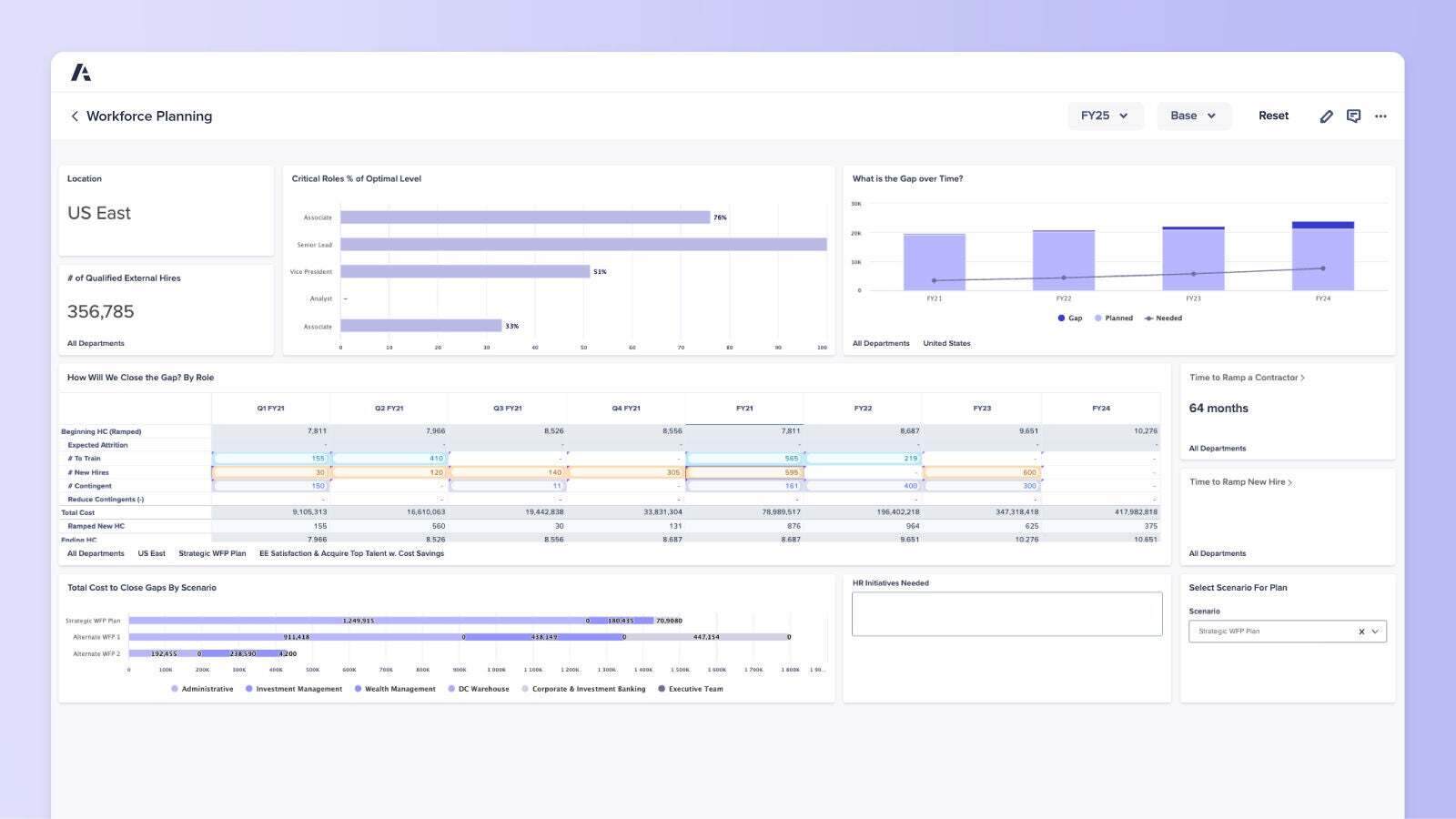
Anaplan is an enterprise planning platform that helps organisations connect workforce planning with financial and operational strategies. It enables HR, Finance, and business teams to forecast headcount requirements, model workforce costs, evaluate skills gaps, and plan for future organisational changes.
Its connected planning capabilities allow businesses to create different workforce scenarios and understand how hiring, employee movement, compensation changes, and restructuring can affect overall business performance. This makes Anaplan particularly useful for enterprises managing complex workforce requirements across multiple departments, regions, and business units.
Key Features of Anaplan
- Strategic Workforce Planning: Align workforce requirements, talent availability, and business objectives with long-term organisational strategies.
- Headcount Forecasting: Forecast future employee requirements based on business growth, hiring plans, and workforce changes.
- Scenario Modelling: Compare different hiring, restructuring, and workforce cost scenarios to support strategic decisions.
- Workforce Cost Planning: Model salaries, compensation, benefits, and other employee-related expenses.
- Skills Gap Analysis: Identify gaps between existing workforce capabilities and future business requirements.
- Connected Planning: Connect workforce plans with financial, operational, and business planning processes.
- Workforce Reporting: Monitor workforce performance, headcount changes, and planning assumptions through dashboards and reports.
Anaplan Pricing
Anaplan follows an enterprise-oriented pricing model. Costs depend on the organisation’s requirements, selected planning applications, platform usage, and implementation scope. Businesses can contact Anaplan to request a customised quotation and product demonstration.
Pricing: Contact Anaplan for a customised quote.
Pros and Cons
Pros | Cons |
Supports strategic and operational workforce planning | May be complex for smaller organisations |
Offers advanced what-if scenario modelling | Requires implementation and configuration |
Connects workforce plans with financial budgets | Pricing is not publicly standardised |
Helps identify workforce demand and skills gaps | May require specialist planning expertise |
These observations are based on published product capabilities, not hands-on testing.
Best for: Large enterprises looking for strategic workforce planning, headcount forecasting, workforce cost modelling, and scenario analysis.
6. Quinyx – Best for Workforce Management and Employee Scheduling

Quinyx is a workforce management platform that helps businesses manage employee schedules, forecast staffing requirements, track labour costs, and optimise workforce operations. It is designed for organisations with shift-based employees, multiple locations, and changing staffing demands.
The platform combines employee scheduling, labour forecasting, time and attendance tracking, and workforce management capabilities. Businesses can use Quinyx to align staffing levels with operational demand, reduce scheduling conflicts, and improve employee productivity.
Key Features of Quinyx
- Employee Scheduling: Create, manage, and adjust employee shifts based on business requirements and workforce availability.
- Labour Forecasting: Forecast staffing requirements using historical data, business demand, and operational trends.
- Workforce Optimisation: Match employee availability, skills, and labour requirements to improve staffing efficiency.
- Time and Attendance Tracking: Monitor employee working hours, attendance, and shift-related activities.
- Labour Cost Management: Track workforce expenses and manage labour budgets more effectively.
- Employee Self-Service: Allow employees to view schedules, manage availability, and request shift changes through digital tools.
- Workforce Analytics: Access reports and insights into staffing levels, labour costs, scheduling, and workforce performance.
- Compliance Management: Support workforce scheduling processes that account for working-time rules and organisational policies.
Who Should Use Quinyx?
Quinyx is suitable for:
- Retail businesses managing employees across multiple stores.
- Restaurants and hospitality businesses with shift-based teams.
- Healthcare and service organisations with changing staffing requirements.
- Companies managing large frontline workforces.
- Operations teams looking to optimise labour costs and employee schedules.
Quinyx Pricing
Quinyx offers customised pricing based on business size, workforce management requirements, selected features, and implementation needs. Organisations can contact its sales team to request a product demonstration and pricing information.
Pricing: Contact Quinyx for a customised quote.
Pros and Cons
Pros | Cons |
Comprehensive employee scheduling capabilities | More focused on workforce management than strategic workforce planning |
Supports labour forecasting and cost control | Pricing is not publicly standardised |
Useful for shift-based and frontline workforces | May be extensive for businesses with small teams |
Provides employee self-service functionality | Implementation may require integration with existing HR systems |
These observations are based on the platform’s product positioning and published capabilities, not hands-on testing.
Best for: Retail, hospitality, healthcare, and other businesses managing shift-based employees and daily workforce operations.
7. Runn – Best for Resource and Capacity Planning

Runn is a resource management and capacity planning platform that helps businesses plan employee availability, allocate resources, forecast workloads, and monitor team utilisation. It is particularly useful for professional services companies, consulting firms, agencies, and project-based organisations that need to manage people and project resources efficiently.
The platform provides visibility into team capacity, project schedules, employee availability, and resource demand. Managers can use Runn to identify resource shortages, balance workloads, forecast future capacity, and make better staffing decisions across multiple projects.
Key Features of Runn
- Resource Planning: Allocate employees and resources to projects based on availability, skills, and business requirements.
- Capacity Planning: Monitor team capacity and identify overutilised or underutilised employees.
- Resource Forecasting: Forecast future resource demand and availability to support project and workforce planning.
- Project Scheduling: Plan project timelines, assign team members, and manage resource requirements.
- Utilisation Tracking: Monitor employee utilisation rates and understand how effectively resources are being used.
- Scenario Planning: Explore alternative resource allocation scenarios and evaluate their impact on project capacity.
- Financial Forecasting: Track project revenue, costs, and resource-related financial performance.
- Reporting and Analytics: Access visual reports and dashboards to monitor resource utilisation, capacity, and project performance.
Who Should Use Runn?
Runn is suitable for:
- Digital marketing and creative agencies managing multiple client projects.
- Consulting firms planning employee allocation across engagements.
- Software development companies managing technical resources.
- Professional services businesses monitoring team utilisation.
- Project managers balancing workloads and future resource demand.
Runn Pricing
Runn offers subscription-based pricing with plans designed for different team sizes and resource management requirements. Pricing and available features may vary depending on the selected plan. Check its official pricing page for current rates.
Pricing: Subscription-based; see Runn pricing for current plans.
Pros and Cons
Pros | Cons |
Provides clear visibility into team capacity and availability | More focused on project resource planning than enterprise-wide HR planning |
Helps identify resource shortages and overutilisation | May not replace a complete HRIS platform |
Supports project scheduling and forecasting | Advanced workforce requirements may need additional tools |
Useful for professional services and project-based teams | Suitability depends on the organisation’s project management workflows |
These observations are based on the platform’s product positioning and published capabilities, not hands-on testing.
Best for: Agencies, consulting firms, and project-based businesses looking for resource allocation, team capacity planning, and utilisation tracking.
8. Planday – Best for Employee Scheduling and Shift Management

Planday is an employee scheduling and workforce management platform that helps businesses organise staff shifts, manage employee availability, track working hours, and control labour costs. It is designed primarily for businesses with hourly and shift-based employees, particularly in hospitality, retail, and service industries.
The platform enables managers to create employee schedules, monitor staffing requirements, manage shift changes, and coordinate team availability. Employees can also access their schedules, communicate with managers, and submit availability or time-off requests through the platform.
Key Features of Planday
- Employee Scheduling: Create and manage employee shifts based on staffing requirements, availability, and business demand.
- Shift Management: Assign shifts, manage shift changes, and coordinate employee schedules across departments or locations.
- Time and Attendance Tracking: Monitor employee working hours, attendance, and timesheets.
- Labour Cost Management: Track staff costs and compare scheduled hours against workforce budgets.
- Employee Self-Service: Allow employees to view schedules, submit availability, and request time off.
- Workforce Communication: Share announcements, updates, and scheduling information with employees.
- Demand-Based Scheduling: Align staffing levels with business activity and operational requirements.
- Reporting and Analytics: Access workforce reports to monitor labour expenses, employee hours, and scheduling performance.
Who Should Use Planday?
Planday is suitable for:
- Restaurants, cafés, and hospitality businesses managing shift-based teams.
- Retail stores coordinating employee schedules across locations.
- Hotels and service businesses with changing staffing requirements.
- Small and medium-sized businesses managing hourly employees.
- Operations managers looking to simplify scheduling and attendance tracking.
Planday Pricing
Planday offers subscription-based pricing with different plans depending on business requirements, workforce size, and selected features. Pricing and plan availability may vary by country and subscription terms.
Pricing: Check the official Planday pricing page for current plans.
Pros and Cons
Pros | Cons |
Easy-to-manage employee scheduling | More focused on shift management than strategic workforce planning |
Supports employee availability and time-off requests | May not meet advanced enterprise headcount forecasting needs |
Helps monitor labour costs and working hours | Pricing and features may vary by region |
Useful for hospitality and retail businesses | Less suited to long-term strategic workforce modelling |
These observations are based on the platform’s product positioning and published capabilities, not hands-on testing.
Best for: Restaurants, retail stores, hospitality businesses, and other organisations that need employee scheduling, shift management, and labour cost tracking.
How to Choose the Best Workforce Planning Software for Your Business
Choosing the right workforce planning software depends on your organisation’s size, workforce structure, operational requirements, and long-term business objectives. The right platform should help you forecast staffing needs, manage employee capacity, identify skills gaps, and make informed workforce decisions.
Before selecting a solution, consider the following factors.
1. Identify Your Workforce Planning Requirements
Start by understanding what your organisation wants to achieve. Some businesses need long-term headcount forecasting, while others require employee scheduling, resource allocation, or workforce analytics.
Identify whether you need:
- Strategic workforce planning and headcount forecasting.
- Employee scheduling and shift management.
- Resource and capacity planning.
- Workforce analytics and reporting.
- Skills gap analysis and talent planning.
- Workforce budgeting and labour cost management.
2. Evaluate Essential Features
Look for software that offers the capabilities your organisation needs to manage its workforce effectively.
Important features include:
- Headcount Forecasting: Predict future staffing requirements based on business growth and workforce demand.
- Scenario Planning: Compare different hiring, restructuring, and workforce allocation scenarios.
- Capacity Planning: Monitor employee availability, workload distribution, and resource utilisation.
- Skills Gap Analysis: Identify missing employee skills and future training requirements.
- Workforce Analytics: Analyse employee trends, productivity, turnover, and staffing costs.
- Reporting and Dashboards: Monitor workforce performance through centralised reports and visual dashboards.
3. Check Integration Capabilities
Your workforce planning platform should work with your existing business systems. Integrations help reduce manual data entry, improve data accuracy, and provide a more complete view of workforce operations.
Consider compatibility with:
- Human Resource Information Systems (HRIS).
- Payroll and compensation platforms.
- Enterprise Resource Planning (ERP) systems.
- Financial planning and budgeting software.
- Applicant Tracking Systems (ATS).
- Project management and resource management tools.
4. Consider Scalability and Business Size
Choose a platform that can support your organisation as its workforce grows. A solution suitable for a small business may not provide the advanced forecasting, reporting, and integration capabilities required by a large enterprise.
Consider employee headcount, multiple locations, departmental structures, user access, and future expansion when evaluating scalability.
5. Compare Pricing and Total Cost of Ownership
Don’t evaluate software based on subscription costs alone. Consider the total investment required to implement and maintain the platform.
Review:
- Monthly or annual subscription fees.
- Per-employee or per-user charges.
- Implementation and onboarding costs.
- Integration and customisation expenses.
- Training and ongoing support.
- Additional charges for advanced features.
6. Evaluate Security and Data Protection
Workforce planning platforms handle sensitive employee information, compensation details, and organisational data. Review the provider’s security practices before adopting a solution.
Look for access controls, role-based permissions, data encryption, audit logs, backup policies, and relevant compliance certifications.
7. Request a Demo or Free Trial
Before making a purchase, evaluate the software using your actual workforce planning requirements. A product demonstration or free trial can help your team understand its usability and practical capabilities.
Test common activities such as creating headcount forecasts, modelling staffing changes, reviewing employee availability, and generating workforce reports.
Workforce Planning Software Selection Checklist
Use this checklist to compare shortlisted platforms before making your decision.
- Supports your workforce planning requirements.
Benefits of Workforce Planning Software
Workforce planning software helps organisations make better staffing decisions by connecting employee data, workforce requirements, and business objectives. Instead of relying on manual spreadsheets and disconnected HR systems, businesses can use these platforms to forecast workforce demand, monitor employee capacity, and manage resources more effectively.
Here are the key benefits of using workforce planning software.
1. Improved Workforce Forecasting
Workforce planning tools help businesses estimate future staffing requirements based on business growth, employee turnover, workload, and operational demand. HR teams can anticipate hiring needs and prepare recruitment strategies before staffing shortages occur.
2. Better Headcount Management
Organisations can monitor current employee numbers, planned positions, vacancies, and departmental staffing requirements. This helps HR and Finance teams maintain better control over headcount and align recruitment decisions with business budgets.
3. Reduced Workforce Costs
By forecasting staffing requirements and monitoring employee expenses, businesses can identify unnecessary labour costs, reduce overstaffing, and allocate resources more efficiently. Workforce budgeting also helps organisations make informed hiring and compensation decisions.
4. Improved Resource Allocation
Workforce planning software provides visibility into employee availability, skills, workloads, and capacity. Managers can assign employees to the right departments, projects, or business activities based on organisational priorities.
5. Skills Gap Identification
Businesses can analyse existing employee skills and compare them with future workforce requirements. This helps HR teams identify skill shortages, plan employee training, and make better recruitment decisions.
6. Data-Driven Decision-Making
Workforce analytics and reporting provide insights into employee turnover, headcount trends, workforce costs, and staffing performance. Business leaders can use this information to make informed decisions about recruitment, workforce development, and organisational growth.
7. Better Strategic Planning
Workforce planning platforms help businesses evaluate different staffing scenarios and prepare for future organisational changes. Companies can assess the workforce impact of expansion, restructuring, new projects, and changing market conditions.
8. Increased Operational Efficiency
Automating workforce forecasting, reporting, and planning activities reduces manual administrative work. HR professionals and managers can spend more time on strategic initiatives instead of maintaining spreadsheets and manually consolidating employee information.
9. Improved Collaboration Between HR and Finance
Workforce planning connects HR requirements with financial budgets. Both teams can work with consistent workforce data, evaluate hiring costs, and align staffing decisions with the organisation’s financial objectives.
Essential Features of Workforce Planning Software
The best workforce planning software should provide the tools businesses need to forecast staffing requirements, manage employee capacity, analyse workforce data, and support strategic decisions. While features vary between platforms, certain capabilities are essential for effective workforce planning.
Here are the key features to consider when evaluating workforce planning solutions.
1. Headcount Planning and Forecasting
Headcount planning helps organisations monitor existing employees, planned positions, vacancies, and future staffing requirements. Forecasting capabilities use workforce data and business assumptions to estimate how many employees will be needed as the organisation grows.
2. Scenario Planning and Modelling
Scenario planning allows businesses to evaluate different workforce situations before making decisions. HR and Finance teams can model hiring increases, employee departures, restructuring, and budget changes to understand their potential impact.
3. Workforce Capacity Planning
Capacity planning helps managers understand employee availability, workloads, and resource utilisation. It allows organisations to identify staffing shortages, balance workloads, and allocate employees according to business demand.
4. Skills Gap Analysis
Skills gap analysis identifies differences between the skills available within the existing workforce and the capabilities required to achieve future business goals. This feature helps businesses plan recruitment, employee training, and professional development.
5. Workforce Analytics and Reporting
Analytics and reporting provide insights into headcount trends, employee turnover, labour costs, workforce distribution, and staffing performance. Customisable dashboards help managers monitor important workforce metrics and make informed decisions.
6. Budgeting and Cost Management
Workforce budgeting helps businesses estimate employee-related expenses, including salaries, benefits, bonuses, and recruitment costs. It also allows Finance teams to compare planned workforce expenditure against actual budgets.
7. Employee Scheduling and Time Management
Some workforce planning platforms include scheduling and time management features to organise employee shifts, track working hours, manage availability, and monitor attendance. These capabilities are particularly useful for retail, hospitality, healthcare, and other shift-based industries.
8. HRIS and Third-Party Integrations
Integration capabilities allow workforce planning platforms to connect with HRIS, payroll, ERP, financial planning, and recruitment systems. This helps organisations consolidate employee information and reduce manual data entry.
9. Automated Alerts and Notifications
Automated alerts notify managers about important workforce changes, staffing shortages, approaching budget limits, employee availability, and other planning requirements. These notifications help teams respond to workforce issues more quickly.
10. Data Security and Access Management
Workforce planning platforms manage sensitive employee and financial information. Security features such as role-based access, data encryption, audit logs, and permission controls help protect organisational data and ensure that employees can access only the information relevant to their roles.
Workforce Planning Software vs Workforce Management Software
Workforce planning software and workforce management software are related business solutions, but they serve different purposes. Workforce planning focuses on forecasting future staffing requirements and aligning employee resources with long-term business objectives, whereas workforce management focuses on managing daily workforce activities such as employee scheduling, attendance, and shift allocation.
Understanding the difference helps businesses choose the right solution based on their operational and strategic requirements.
Key Differences Between Workforce Planning and Workforce Management Software
| Comparison | Workforce Planning Software | Workforce Management Software |
|---|---|---|
| Primary purpose | Plan future workforce requirements | Manage daily workforce operations |
| Main focus | Strategic staffing and headcount forecasting | Scheduling and employee management |
| Planning horizon | Medium- to long-term | Daily, weekly, and monthly |
| Headcount management | Forecast future employee requirements | Manage current staffing levels |
| Resource allocation | Align workforce with business goals | Assign employees to shifts and tasks |
| Cost management | Forecast salaries and workforce budgets | Monitor labour costs and working hours |
| Skills management | Identify future skills gaps | Match available employees with operational needs |
| Analytics | Workforce trends and future demand | Attendance, productivity, and scheduling |
| Primary users | HR leaders, Finance teams, and business planners | Operations managers, HR teams, and supervisors |
What Is Workforce Planning Software?
Workforce planning software helps organisations determine how many employees they will need, which skills are required, and how workforce resources should align with future business goals.
For example, a company planning to expand its operations over the next two years can use workforce planning software to forecast hiring requirements, estimate salary expenses, identify skills shortages, and prepare recruitment budgets.
What Is Workforce Management Software?
Workforce management software helps businesses manage existing employees and their day-to-day work schedules. It provides tools for employee scheduling, attendance tracking, time management, shift allocation, and labour cost monitoring.
For example, a restaurant can use workforce management software to schedule employees across different shifts, manage availability, track working hours, and ensure sufficient staff are available during busy periods.
Which Software Should Your Business Choose?
Choose workforce planning software if your organisation needs to:
- Forecast future hiring and staffing requirements.
- Plan headcount and workforce budgets.
- Identify skills gaps and future talent requirements.
- Evaluate workforce scenarios and business expansion plans.
- Align HR strategies with long-term business objectives.
Choose workforce management software if your organisation needs to:
- Create and manage employee schedules.
- Track attendance and working hours.
- Manage shift changes and employee availability.
- Monitor daily labour costs.
- Optimise staffing for day-to-day operations.
Important: Some platforms offer both workforce planning and workforce management capabilities. Evaluate their actual features and intended use cases rather than relying only on the product category.
Types of Workforce Planning Software
Workforce planning software comes in different categories depending on an organisation’s staffing requirements, workforce structure, and business objectives. Some platforms focus on strategic headcount forecasting, while others specialise in employee scheduling, workforce analytics, or resource allocation.
Understanding these categories helps businesses identify the right solution for their workforce planning needs.
1. Strategic Workforce Planning Software
Strategic workforce planning software helps organisations align future staffing requirements with long-term business goals. It enables HR leaders and business planners to forecast headcount, identify skills gaps, evaluate workforce scenarios, and prepare for organisational changes.
Key capabilities:
- Long-term workforce forecasting.
- Headcount and succession planning.
- Skills gap analysis.
- Scenario modelling.
- Strategic talent planning.
Suitable for: Medium-sized and large enterprises planning long-term workforce requirements.
2. Workforce Forecasting Software
Workforce forecasting software helps businesses predict future staffing requirements based on historical workforce data, business growth, employee turnover, and operational demand.
Key capabilities:
- Employee demand forecasting.
- Headcount predictions.
- Hiring requirement analysis.
- Labour demand forecasting.
- Workforce trend analysis.
Suitable for: Organisations that need to anticipate staffing requirements and prepare recruitment plans.
3. Workforce Analytics Software
Workforce analytics software helps organisations analyse employee data and identify trends that influence workforce performance and business decisions.
Key capabilities:
- Employee turnover analysis.
- Workforce performance reporting.
- Headcount analytics.
- Skills and talent insights.
- Predictive workforce analytics.
Suitable for: HR teams and business leaders who rely on workforce data for strategic decision-making.
4. Resource and Capacity Planning Software
Resource and capacity planning software helps businesses understand employee availability, workload distribution, and resource utilisation. It enables managers to allocate employees to projects and activities based on their skills and capacity.
Key capabilities:
- Employee capacity tracking.
- Resource allocation.
- Workload management.
- Project resource forecasting.
- Utilisation reporting.
Suitable for: Consulting firms, IT companies, agencies, and project-based organisations.
5. Workforce Management and Scheduling Software
Workforce management software focuses on managing daily staffing operations, including employee scheduling, shift planning, attendance, and working hours.
Key capabilities:
- Employee shift scheduling.
- Time and attendance tracking.
- Employee availability management.
- Labour cost monitoring.
- Shift optimisation.
Suitable for: Retail, hospitality, healthcare, restaurants, and other businesses with shift-based employees.
6. Workforce Budgeting and Financial Planning Software
Workforce budgeting software connects employee planning with financial forecasting and business budgets. It helps Finance and HR teams estimate employee-related expenses and understand the financial impact of staffing decisions.
Key capabilities:
- Salary and compensation planning.
- Headcount budgeting.
- Employee cost forecasting.
- Workforce expense analysis.
- Financial scenario modelling.
Suitable for: Finance departments, HR leaders, and enterprises managing large workforce budgets.
Workforce Planning Process: A Step-by-Step Guide
An effective workforce planning process helps organisations ensure they have the right number of employees, with the right skills, in the right roles at the right time. By analysing current workforce capabilities and forecasting future business requirements, companies can prepare for staffing changes and reduce talent shortages.
Here are seven important steps to build an effective workforce planning strategy.
1. Analyse Your Current Workforce
Start by evaluating your organisation’s existing workforce structure, including employee numbers, job roles, skills, experience, and departmental distribution.
Review important workforce metrics such as:
- Total employee headcount.
- Employee turnover and retention rates.
- Workforce age and experience distribution.
- Existing employee skills and qualifications.
- Departmental staffing levels.
- Employee productivity and utilisation.
This assessment helps HR teams understand current workforce strengths and identify areas that need improvement.
2. Identify Future Business and Workforce Requirements
Understand your organisation’s future business objectives and determine how they will influence workforce requirements.
For example, business expansion, new product launches, digital transformation, and additional operational locations may create demand for new employees and specialised skills.
Consider factors such as:
- Expected business growth.
- Future hiring requirements.
- New roles and responsibilities.
- Technology and automation changes.
- Departmental expansion.
- Changes in customer demand.
3. Identify Workforce Skills Gaps
Compare the skills available within your existing workforce against the capabilities required to achieve future business goals.
Identify employees who may need additional training and roles that require external recruitment.
For example, a company introducing AI-powered business operations may need employees with data analytics, machine learning, and automation skills.
4. Forecast Workforce Demand and Supply
Estimate the number of employees and skills your organisation will need in the future. At the same time, assess the availability of existing employees and potential talent from external recruitment.
Workforce demand forecasting considers future staffing requirements, while workforce supply forecasting evaluates available internal and external talent.
Use historical workforce data, employee turnover trends, business forecasts, and recruitment information to develop realistic projections.
5. Develop a Workforce Action Plan
Once workforce gaps are identified, prepare an action plan to address them.
Possible strategies include:
- Recruiting employees for critical positions.
- Upskilling and reskilling existing employees.
- Promoting internal talent.
- Improving employee retention.
- Outsourcing specific business activities.
- Redistributing employees across departments.
Prioritise actions based on business requirements, available budgets, and expected timelines.
6. Implement Workforce Planning Strategies
Put the workforce action plan into practice by coordinating HR, Finance, department managers, and business leaders.
Use workforce planning software to manage headcount forecasts, employee allocation, hiring budgets, and workforce scenarios.
Establish clear responsibilities, timelines, and performance indicators to track implementation progress.
7. Monitor, Measure, and Update Workforce Plans
Workforce planning is an ongoing process. Regularly review your workforce strategy to ensure it remains aligned with changing business requirements.
Monitor important metrics such as:
- Headcount forecast accuracy.
- Employee turnover rate.
- Time to hire.
- Labour cost per employee.
- Skills gap closure.
- Employee utilisation rate.
- Workforce productivity.
Use these insights to identify planning gaps, adjust recruitment strategies, and update future workforce forecasts.
Example of Workforce Planning in Practice
Consider a technology company planning to expand its operations from 200 employees to 350 employees over the next 12 months.
The HR and Finance teams can use workforce planning software to:
- Analyse the existing 200 employees and their skills.
- Identify future staffing requirements across departments.
- Forecast the additional 150 employees needed.
- Estimate recruitment expenses and salary budgets.
- Identify skills gaps and training requirements.
- Create hiring and workforce allocation plans.
- Monitor recruitment progress and update forecasts.
This approach helps the organisation prepare for growth while keeping hiring decisions aligned with business objectives and financial budgets.
Workforce Planning Models and Examples
Workforce planning models help organisations evaluate their current employee capacity, forecast future staffing requirements, and develop strategies to address workforce gaps. Businesses can use different models depending on their industry, workforce structure, business objectives, and planning horizon.
Here are some commonly used workforce planning models and practical examples.
1. Supply and Demand Workforce Planning Model
The supply and demand model compares the employees and skills currently available within an organisation against the workforce required to achieve future business objectives.
It helps businesses identify potential staffing shortages, surplus employees, and recruitment requirements.
Example: A manufacturing company expects production demand to increase by 30% over the next year. By comparing current employee capacity with projected production requirements, the HR team can estimate how many additional production workers, supervisors, and technicians are needed.
Best for: Organisations forecasting future staffing requirements and identifying workforce shortages.
2. Gap Analysis Workforce Planning Model
Workforce gap analysis identifies the difference between an organisation’s current workforce capabilities and its future staffing requirements.
It considers employee numbers, technical skills, experience, qualifications, and departmental requirements.
Example: A financial services company plans to introduce new data analytics services. Its workforce assessment identifies a shortage of data analysts and data engineers. The HR team can address the gap through recruitment, training, or internal employee development.
Best for: Businesses identifying skills shortages and planning employee development.
3. Scenario-Based Workforce Planning Model
Scenario-based workforce planning allows organisations to evaluate different business situations and understand how each scenario could affect future workforce requirements.
Businesses can create multiple scenarios based on changes in revenue, business expansion, employee turnover, automation, or market demand.
Example: A retail company creates three workforce scenarios:
- Growth scenario: Increase staffing to support new store openings.
- Stable scenario: Maintain current employee numbers and staffing budgets.
- Cost reduction scenario: Reduce hiring and optimise existing workforce allocation.
Best for: Enterprises managing uncertainty and evaluating different workforce strategies.
4. Strategic Workforce Planning Model
Strategic workforce planning connects long-term business objectives with future employee requirements and organisational capabilities.
It helps companies prepare for business expansion, digital transformation, technological changes, and evolving skill requirements.
Example: A technology company plans to expand its AI services over the next three years. The HR team identifies future demand for AI engineers, cloud architects, data scientists, and cybersecurity specialists. It then develops recruitment and employee training strategies to prepare for future requirements.
Best for: Medium-sized and large organisations planning long-term workforce transformation.
5. Succession Planning Model
Succession planning identifies employees who can take over important leadership and business-critical roles when existing employees retire, resign, or move into different positions.
It helps organisations maintain leadership continuity and reduce the risk of critical talent shortages.
Example: A company identifies five senior management positions that may become vacant over the next two years. HR evaluates internal talent, identifies potential successors, and creates leadership development plans.
Best for: Organisations preparing future leaders and managing critical positions.
6. Zero-Based Workforce Planning Model
Zero-based workforce planning evaluates staffing requirements from the ground up rather than simply using existing employee numbers as the starting point.
Each role and position is assessed based on actual business requirements, operational priorities, and expected workload.
Example: A business restructuring its operations reviews every department’s staffing requirements. Instead of automatically replacing employees who leave, managers assess whether each position is still necessary and whether responsibilities can be redistributed.
Best for: Businesses undergoing restructuring, cost optimisation, or organisational transformation.
Comparison of Workforce Planning Models
| Workforce Planning Model | Primary Focus | Best Use Case |
|---|---|---|
| Supply and Demand | Employee availability vs future requirements | Staffing forecasts |
| Gap Analysis | Current vs required workforce capabilities | Skills development |
| Scenario-Based Planning | Different possible business situations | Uncertain business conditions |
| Strategic Workforce Planning | Long-term business and talent alignment | Organisational growth |
| Succession Planning | Future leadership and critical roles | Leadership continuity |
| Zero-Based Planning | Justifying every workforce position | Restructuring and cost optimisation |
Choosing the right workforce planning model depends on your organisation’s objectives. Many businesses combine multiple models to develop a comprehensive workforce strategy that addresses current staffing needs and future business requirements.
Workforce Planning Software for Different Business Sizes
The right workforce planning software depends on your organisation’s size, employee structure, operational complexity, and budget. Small businesses may need simple employee scheduling and capacity planning tools, while large enterprises often require advanced headcount forecasting, workforce analytics, and financial modelling capabilities.
Here’s how to choose workforce planning software based on business size.
1. Workforce Planning Software for Small Businesses
Small businesses generally need affordable and easy-to-use platforms that help manage employee availability, staffing requirements, workloads, and basic workforce operations.
Important capabilities include:
- Employee scheduling and shift management.
- Basic workforce forecasting.
- Employee availability tracking.
- Workload and capacity management.
- Affordable subscription plans.
- Simple reporting and dashboards.
Suitable software: Planday, Runn.
2. Workforce Planning Software for Medium-Sized Businesses
Medium-sized businesses often require more advanced workforce planning capabilities as they expand across departments, locations, and business functions.
Look for platforms that support:
- Headcount planning and forecasting.
- Workforce analytics and reporting.
- Resource and capacity planning.
- HRIS and payroll integrations.
- Employee cost management.
- Skills gap analysis.
- Workforce scenario planning.
Suitable software: ChartHop, Planful, Runn.
3. Workforce Planning Software for Large Enterprises
Large enterprises need comprehensive workforce planning platforms that can manage complex organisational structures, multiple departments, geographical locations, and long-term business strategies.
Important capabilities include:
- Strategic workforce planning.
- Advanced headcount forecasting.
- Workforce scenario modelling.
- Financial and compensation planning.
- Enterprise data integrations.
- Predictive workforce analytics.
- Role-based access and data security.
- Multi-department workforce reporting.
Suitable software: Anaplan, Board, Visier.
Comparison of Workforce Planning Software by Business Size
| Business Size | Main Requirements | Software to Consider |
|---|---|---|
| Small businesses | Scheduling, availability, basic capacity planning | Planday, Runn |
| Medium-sized businesses | Headcount planning, workforce analytics, budgeting | ChartHop, Planful, Runn |
| Large enterprises | Strategic planning, scenario modelling, advanced analytics | Anaplan, Board, Visier |
These are indicative starting points based on product positioning, not exclusive suitability recommendations. Actual fit depends on features, pricing, integrations, and organisational requirements.
Common Workforce Planning Challenges and How to Overcome Them
Workforce planning helps businesses prepare for future staffing requirements, but organisations can face several challenges when managing employee data, forecasting talent demand, and aligning workforce strategies with business goals.
Understanding these challenges helps HR teams develop better planning strategies and make more effective workforce decisions.
1. Inaccurate Workforce Forecasting
Challenge: Businesses may struggle to predict future staffing requirements because of changing market conditions, employee turnover, business expansion, and fluctuating customer demand. Inaccurate forecasts can lead to overstaffing or employee shortages.
How to overcome it: Use workforce forecasting software to analyse historical employee data, business growth trends, turnover rates, and future staffing requirements. Regularly update forecasts to reflect changing business conditions.
2. Skills Gaps and Talent Shortages
Challenge: Organisations may not have employees with the skills required to support future business objectives. Technology changes and evolving industry requirements can make existing workforce capabilities insufficient.
How to overcome it: Conduct regular skills assessments, identify critical talent gaps, and develop employee training and reskilling programmes. Use recruitment strategies to attract employees with specialised capabilities.
3. Poor Workforce Data Management
Challenge: Employee information may be spread across multiple HR systems, spreadsheets, payroll platforms, and departmental databases. Inconsistent or outdated information can affect workforce planning accuracy.
How to overcome it: Integrate workforce planning platforms with HRIS, payroll, and other business systems. Maintain centralised employee records and establish regular data validation processes.
4. High Employee Turnover
Challenge: Frequent employee departures can disrupt workforce plans, increase recruitment expenses, and create unexpected staffing shortages.
How to overcome it: Monitor employee turnover trends, identify retention risks, improve employee engagement, and develop succession plans for business-critical positions.
5. Limited Collaboration Between HR and Finance
Challenge: HR and Finance teams may use different data sources and planning assumptions. This can create inconsistencies between hiring plans, headcount forecasts, and financial budgets.
How to overcome it: Connect workforce planning with financial planning processes. Establish shared reporting dashboards, consistent workforce metrics, and regular collaboration between HR and Finance teams.
6. Changing Business Requirements
Challenge: Business expansion, restructuring, automation, and market changes can quickly affect staffing requirements. Workforce plans based on outdated assumptions may no longer support organisational objectives.
How to overcome it: Use scenario planning to evaluate different business situations. Review workforce forecasts regularly and update staffing strategies whenever business priorities change.
7. Lack of Workforce Planning Technology
Challenge: Businesses relying entirely on spreadsheets and manual processes may experience reporting delays, data inconsistencies, and limited visibility into future staffing requirements.
How to overcome it: Adopt suitable workforce planning software that automates forecasting, headcount management, resource allocation, and workforce reporting.
8. Difficulty Managing Workforce Costs
Challenge: Salary increases, recruitment expenses, overtime, employee benefits, and changing staffing levels can make workforce budgets difficult to manage.
How to overcome it: Implement workforce budgeting and cost forecasting processes. Monitor planned versus actual employee expenses and evaluate the financial impact of hiring decisions before approving new positions.
Workforce Planning Software Pricing: What Should Businesses Expect?
Workforce planning software pricing varies depending on the platform, number of employees, selected features, deployment requirements, and business size. Some solutions offer subscription-based plans for small and medium-sized businesses, while enterprise platforms typically provide customised pricing based on organisational requirements.
Before selecting a workforce planning solution, businesses should understand the different pricing models and costs involved.
1. Common Workforce Planning Software Pricing Models
Per-User Pricing
Some software providers charge based on the number of users accessing the platform. This model is suitable for businesses that need workforce planning access for specific HR teams, managers, or department heads.
Per-Employee Pricing
Certain workforce platforms calculate subscription costs based on the total number of employees managed within the system. This model is common among employee scheduling and workforce management solutions.
Subscription-Based Pricing
Subscription pricing provides access to software features through monthly or annual payment plans. Pricing may vary depending on the selected package, number of users, and available capabilities.
Custom Enterprise Pricing
Enterprise workforce planning platforms often provide customised quotations based on employee headcount, integrations, implementation requirements, security needs, and advanced planning features.
2. Factors That Influence Workforce Planning Software Costs
The overall cost of workforce planning software depends on several factors:
- Number of Employees: Larger workforces may require higher subscription tiers or additional capacity.
- Software Features: Advanced forecasting, scenario modelling, analytics, and automation can influence pricing.
- Number of Users: More managers and HR professionals accessing the platform may increase subscription costs.
- Integration Requirements: Connecting HRIS, payroll, ERP, and financial systems may involve additional expenses.
- Implementation and Training: Enterprise deployments may require onboarding, configuration, data migration, and employee training.
- Customer Support: Premium support and dedicated account management may be included in higher-priced packages or charged separately.
3. Additional Costs to Consider
Apart from subscription fees, businesses should consider other expenses associated with implementing and maintaining workforce planning software.
| Cost Component | What It Covers |
|---|---|
| Implementation | Initial platform setup and configuration |
| Data Migration | Transferring existing employee and workforce information |
| Integrations | Connecting HR, payroll, and financial systems |
| Training | Preparing employees and managers to use the platform |
| Customisation | Configuring workflows, reports, and dashboards |
| Maintenance | Ongoing support, upgrades, and platform management |
4. How to Choose Software Within Your Budget
Before purchasing a workforce planning platform, consider these recommendations:
- Define your workforce planning requirements before comparing subscription plans.
- Compare the features included in each pricing tier.
- Request customised quotations from enterprise software providers.
- Check whether implementation and integration costs are included.
- Evaluate annual subscriptions against monthly payment options.
- Request a demo or trial before making a purchasing decision.
- Consider the total cost of ownership rather than subscription price alone.
Important: Workforce planning software providers may not publish their complete pricing online. Always confirm current subscription fees, implementation costs, and additional charges directly with the vendor.
Frequently Asked Questions About Workforce Planning Software.
1. What is workforce planning software?
Workforce planning software is a business application that helps organisations forecast staffing requirements, manage employee capacity, identify skills gaps, and align workforce resources with business objectives. It supports HR teams and business leaders in making data-driven hiring and workforce decisions.
2. What is the best workforce planning software?
Some popular workforce planning platforms include ChartHop, Board, Planful, Visier, Anaplan, Quinyx, Runn, and Planday. The best choice depends on your organisation’s requirements, such as headcount forecasting, workforce analytics, resource allocation, financial planning, or employee scheduling.
3. What are the key features of workforce planning software?
Important features include headcount forecasting, scenario planning, workforce analytics, skills gap analysis, capacity planning, employee cost management, budgeting, reporting, and HR system integrations.
4. How does workforce planning software help businesses?
It helps businesses anticipate staffing requirements, optimise employee allocation, control workforce costs, identify talent shortages, improve resource utilisation, and align hiring strategies with long-term business goals.
5. What is the difference between workforce planning and workforce management?
Workforce planning focuses on future staffing requirements, headcount forecasting, and long-term workforce strategies. Workforce management focuses on daily employee operations, including shift scheduling, attendance tracking, working hours, and labour management.
6. Is workforce planning software suitable for small businesses?
Yes. Small businesses can use workforce planning software to manage employee availability, forecast staffing requirements, allocate resources, and monitor workloads. Solutions such as Runn and Planday may be worth considering depending on their specific requirements.
7. How much does workforce planning software cost?
Pricing varies based on employee headcount, software features, subscription plans, integrations, and implementation requirements. Some providers offer subscription-based pricing, while enterprise platforms generally provide customised quotations.
8. Can workforce planning software integrate with HR and payroll systems?
Yes. Many workforce planning platforms support integrations with HRIS, payroll, ERP, financial planning, and recruitment systems. These integrations help businesses consolidate employee data and improve workforce reporting.
9. What industries use workforce planning software?
Workforce planning software is used across technology, healthcare, manufacturing, retail, hospitality, financial services, consulting, and professional services. Each industry uses these platforms to address different staffing, capacity, and workforce forecasting requirements.
10. What is strategic workforce planning?
Strategic workforce planning is the process of aligning an organisation’s future workforce requirements with its long-term business objectives. It involves forecasting talent demand, identifying skills gaps, evaluating workforce scenarios, and developing hiring and employee development strategies.
11. What are the benefits of automated workforce planning?
Automated workforce planning reduces manual administrative work, improves forecasting efficiency, centralises workforce information, supports faster reporting, and helps organisations respond to staffing changes more effectively.
12. How do I choose the right workforce planning solution?
Start by identifying your workforce requirements, evaluating essential features, checking integrations, comparing pricing, assessing scalability, and requesting product demonstrations. Choose a platform that meets your current needs and can support future business growth.
Conclusion – Choosing the Right Workforce Planning Software
Workforce planning software plays an important role in helping organisations forecast staffing requirements, manage employee capacity, identify skills gaps, and align workforce strategies with business objectives. From headcount forecasting and workforce analytics to resource allocation and employee scheduling, these platforms help businesses make informed decisions about their workforce.
The right solution depends on your organisation’s size, operational requirements, planning priorities, and budget. While ChartHop, Board, Planful, Visier, and Anaplan offer capabilities for workforce analytics, financial planning, and strategic forecasting, Quinyx, Runn, and Planday focus more on workforce management, resource allocation, and employee scheduling.
Before making a decision, compare the available features, integrations, pricing, scalability, and implementation requirements. Request product demonstrations and evaluate how each platform supports your organisation’s workforce planning goals.
Choosing the right workforce planning solution can help your business prepare for future staffing needs, optimise employee resources, control workforce costs, and build a more effective workforce strategy.